How do you know the Tensor models aren’t loading correctly, and that it’s using the .ox models instead? If true, it could explain the terrible performance on my 4090.
1 Like
Because I noticed that, once I pressed (15s) Preview, this beta started downloading a model, like it should, but then something a bit unusual happened. I tend to have a habit to observe the folder, where the models “land”. You can imagine the rest. 
I noticed that this VEAI didn’t just stop at downloading the Chronos (and then Apollo) model file for given resolution, but, apparently, failed with using it, then went for downloading next one (for different resolution) - I noticed them appearing in that folder. And so on, until I had 12 model files for Chronos v3. The same happened to Apollo model, so I’ll stop further testing for now, since downloading, for example, ~230MB Apollo model files times twelve gives a bit of a headache every time I’d like to press Preview again. 
Since the model files list is sorted from the newest to oldest in that screen, you can see, that the program stopped at the .ox file, which is the newest (as of time of file creation), and this .ox file has the same “resolution” as the TensorRT file at the bottom (for 480p → 1080p upscaling, with Proteus and frames interpolation), which would normally be used.
A fragment of log showing what’s happening:
2023-04-03 08-17-38.792 Thread: 32700 Info OUT: 7 2023-04-03 08-17-38,791 Thread: 9724 Info RESULT for  https://veai-models.topazlabs.com /chr-v3-fp16-576x408-rt806-8500.tz  is  200


2023-04-03 08-17-39.731 Thread: 32700 Info OUT: 7 2023-04-03 08-17-39,731 Thread: 9724 Info Compressed Buffer for "chr-v3-fp16-576x408-rt806-8500.tz" verified


2023-04-03 08-17-39.735 Thread: 32700 Debug Updating video info {"sar":1,"framerate":60,"startNumber":1,"frames":900.9,"progress":0,"status":2,"frame":0,"procStatus":{"status":2,"eta":0,"fps":0,"message":" Model Downloaded","pass":1,"error":"","progress":0,"frame":0,"priority":3,"requestPos":5,"processorIndex":0}}
2023-04-03 08-17-39.735 Thread: 32700 Info OUT: 7 2023-04-03 08-17-39,735 Thread: 9724 Info putting fetched file into:  "C:\\ProgramData\\Topaz Labs LLC\\Topaz Video AI BETA\\models\\"

:AIINFO: Model Downloaded


2023-04-03 08-17-39.825 Thread: 32700 Info OUT: 7 2023-04-03 08-17-39,825 Thread: 9724 Info Created temporary file at  "C:/ProgramData/Topaz Labs LLC/Topaz Video AI BETA/models//chr-v3-fp16-576x408-rt806-8500.tz"  with  48564428  bytes


2023-04-03 08-17-39.830 Thread: 32700 Debug Updating video info {"sar":1,"framerate":60,"startNumber":1,"frames":900.9,"progress":0,"status":2,"frame":0,"procStatus":{"status":2,"eta":0,"fps":0,"message":" Loading Model","pass":1,"error":"","progress":0,"frame":0,"priority":3,"requestPos":5,"processorIndex":0}}
2023-04-03 08-17-39.830 Thread: 32700 Info OUT: 7 :AIINFO: Loading Model

2023-04-03 08-17-39,829 Thread: 9724 Info Reading model file duration: 0.023 ms


2023-04-03 08-17-39.844 Thread: 32700 Info OUT: 7 2023-04-03 08-17-39,843 Thread: 9724 Critical TRT Issue WARN  Using an engine plan file across different models of devices is not recommended and is likely to affect performance or even cause errors.


2023-04-03 08-17-39.979 Thread: 32700 Info OUT: 7 2023-04-03 08-17-39,978 Thread: 9724 Critical TRT Issue ERROR 1: [raiiMyelinGraph.h::nvinfer1::RAIIMyelinGraph::RAIIMyelinGraph::24] Error Code 1: Myelin (Compiled against cuBLASLt 11.11.3.0 but running against cuBLASLt 11.10.1.0.)

2023-04-03 08-17-39,978 Thread: 9724 Critical Can't create TensorRT context


2023-04-03 08-17-39.983 Thread: 32700 Info OUT: 7 2023-04-03 08-17-39,983 Thread: 9724 Critical Loading default error reading file:  "C:\\ProgramData\\Topaz Labs LLC\\Topaz Video AI BETA\\models\\/chr-v3-fp16-576x408-rt806-8500.tz"

:AIERROR: Model Failed


2023-04-03 08-17-40.013 Thread: 32700 Info OUT: 7 2023-04-03 08-17-40,013 Thread: 9724 Critical Unable to create or load model of type  tensorrt  from path:  "chr-v3-fp16-576x408-rt806-8500.tz"

2023-04-03 08-17-40,013 Thread: 9724 Critical BackendRunner cannot be initialized for model:  "chr-v3-fp16-576x408-rt806-8500.tz"


2023-04-03 08-17-40.014 Thread: 32700 Info OUT: 7 2023-04-03 08-17-40,013 Thread: 9724 Warning Failed to load model "chr-v3-fp16-576x408-rt806-8500.tz" "fp16-[H]x[W]-rt[C]-[R].tz" "out"
1 Like
That seems pretty conclusive, thanks.
Guys? Any comment? Tensor are models not working for ‘new’ Chronos model?
Not only new Chronos, Apollo as well. Only .ox frame interpolation models work for now for 3000 and 4000 RTX cards in this beta it seems.
1 Like
The Apollo one using .ox files on RTX 40 series is pretty easy to explain.
In the .json file that lists all the possible AI models and their backends that can be downloaded, Apollo is marked as not supporting the RTX 40 series (Ada LoveLace architecture) when using TensorRT. At least that’s how I’m interpreting what I see.
Whether this is an oversight on the developers part or was intentionally done due to issues found during testing, I do not know.
The RTX 30 series I’m not so sure about.
Explanation:
In the .json files for the AI models, under the TensorRT section there is a “capabilities” section with some numbers (601, 705, 806). I assume these correspond to CUDA compute capabilities 6.1 (Pascal), 7.5 (Turing), and 8.6 (Ampere). You will notice that 809 (8.9 Ada Lovelace) is missing which means the RTX 40 series are not supported by this backend for this model.
Other models that do run under TensorRT on the Ada Lovelace architecture have 809 listed under their capabilities section, and the 809 model is downloaded for them.
3 Likes
Thanks for this info! So just out of curiosity, I modified the chf-3.json file and added the 809 entry:
   "tensorrt": {
        "capabilities": [
            601,
            705,
            806,
			809
        ],
Lo and behold, a new model was downloaded, chr-v3-fp16-384x480-rt809-8500.tz, and now the new Chronos is running, AND using the Tensor cores, because it’s running at ~18-19 fps!
Imagine if the devs cared to comment on this instead of letting us struggle with it for days, LOL.
I am going to assume that Apollo can also be ‘fixed’ in this way.
Now all we need to know is what changed with the Chronos model!
1 Like
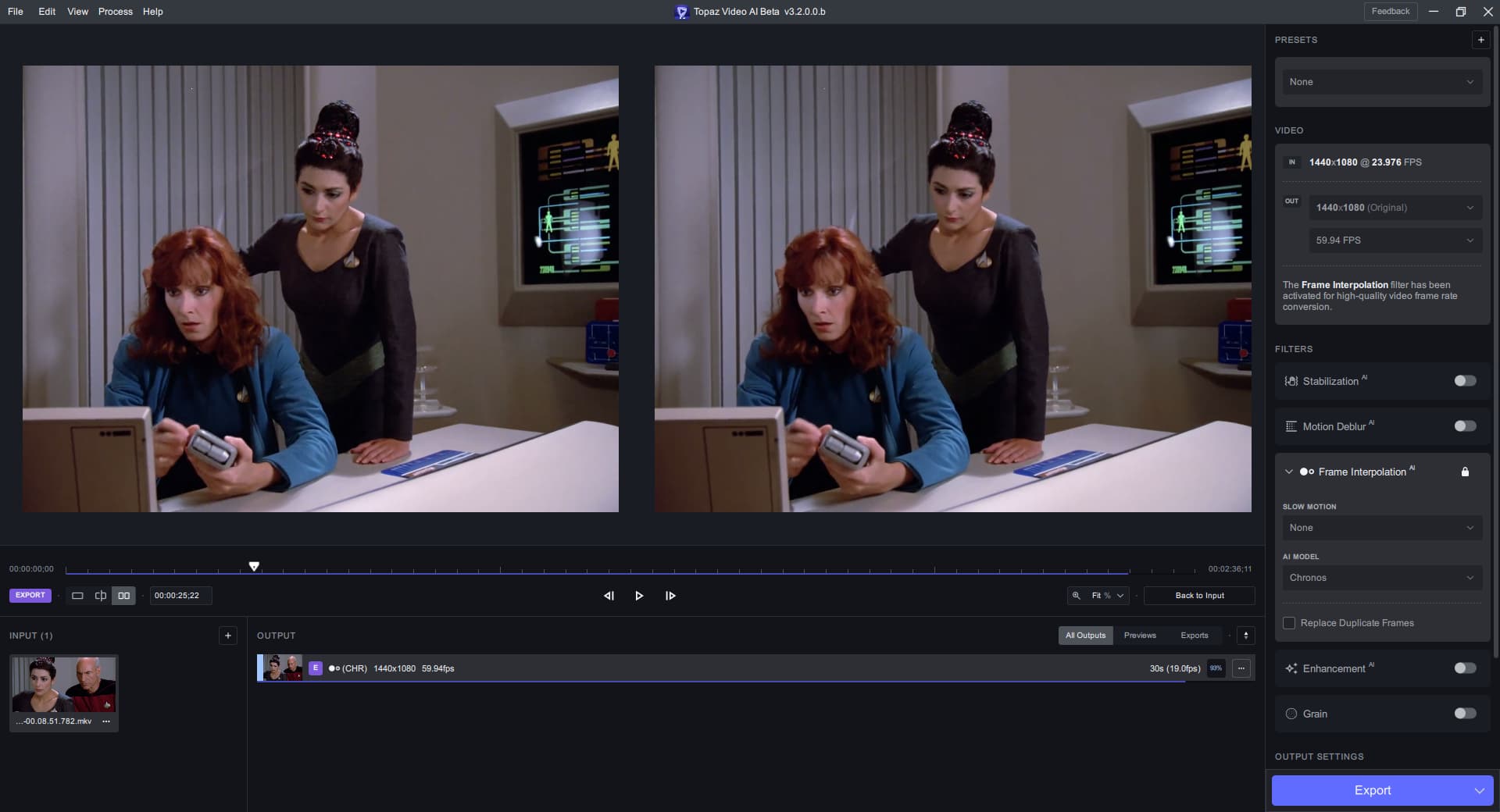
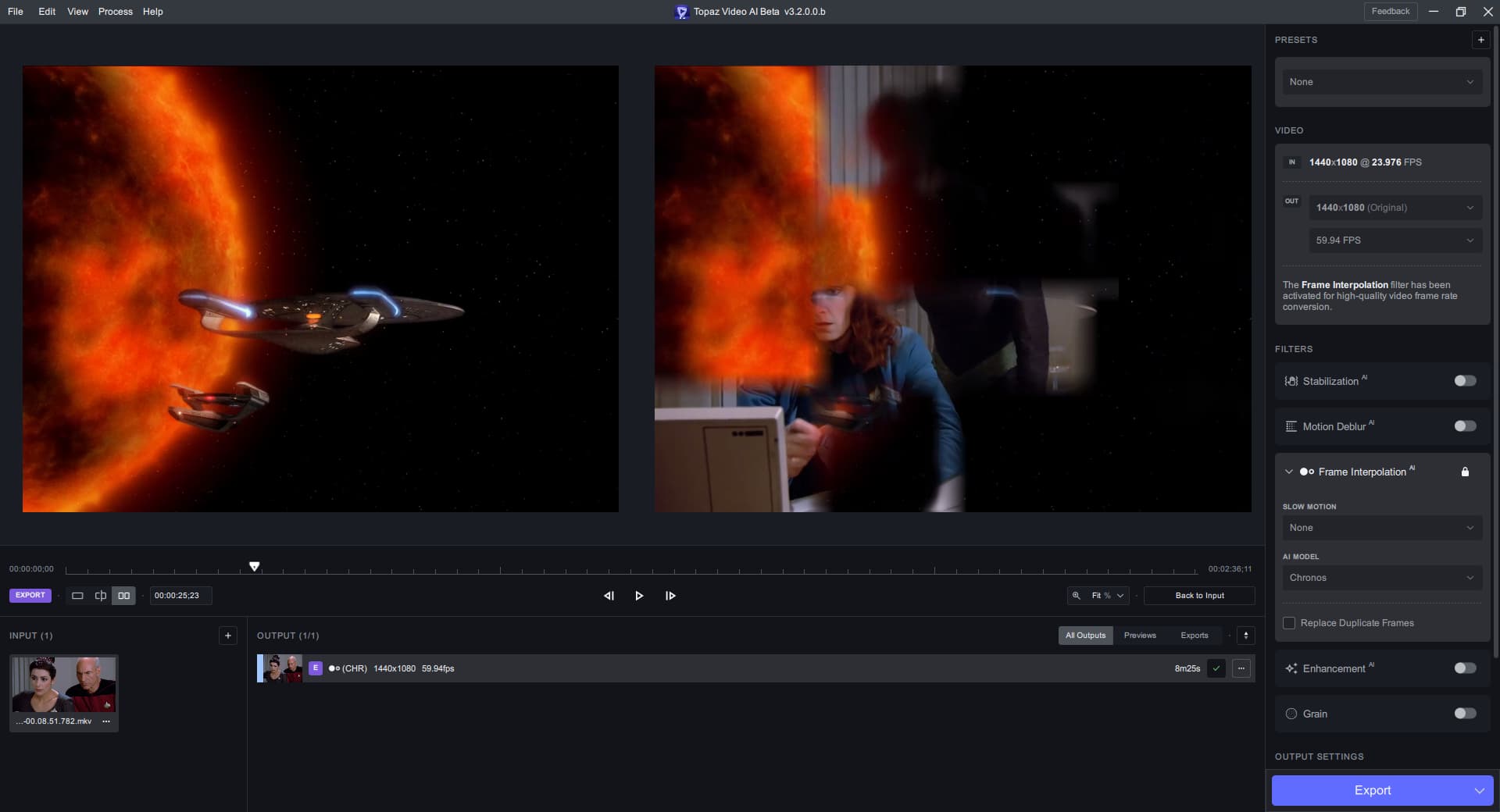
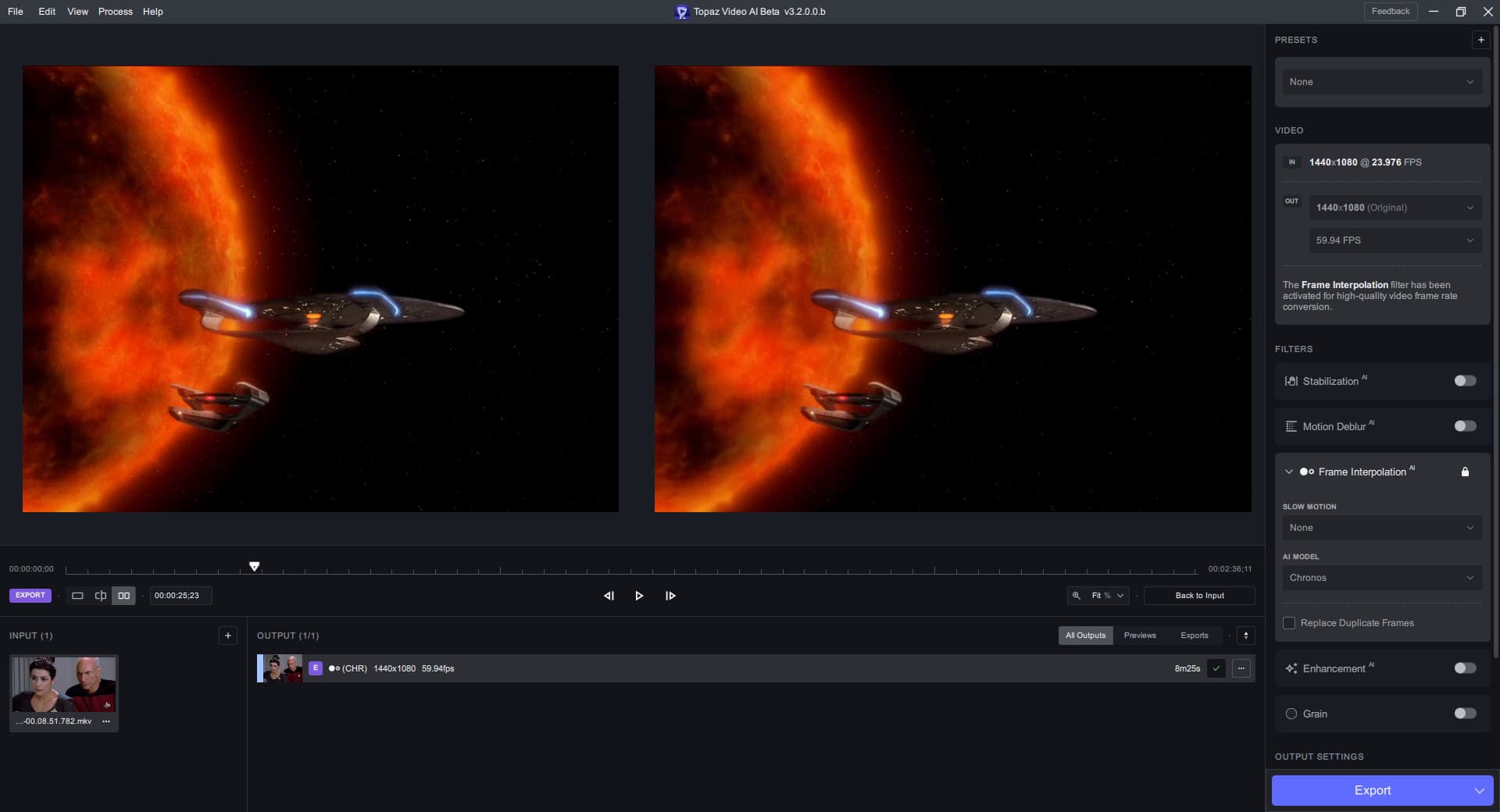
I can say they definitely have not added scene change detection to Chronos v3!
Scene from Star Trek test, look at the interpolated frame between the scene change, LOL:
Proteus does not retain brightness in 3.2.0.0.b
Dark areas get brightened up slightly and in pure black areas with titles, there occur darker black splotches around the text.
This was not the case in release version 3.1.11
RTX 3060 Ti, Studio Driver 531.41, Windows 11
Can you share some examples of this and even add a video to the dropbox for the issue.
I’m glad you guys figured it out. The issue was not only that the entry were missing but also we need to convert and upload the files.
All the issues reported by you guys should be fixed in the release version.
I’m sorry we didn’t keep you posted, but the comments really helped.
4 Likes
@suraj @gregory.maddra Topaz Video AI has a short coming of smallest time around 6 sec trim for frames smallest number is 360for individual frames. Uploading Frames would be no less than 360 files.Workflow from this to the Photo Products makes large amount of files for TIFF PNG and JPEG. Trimming needs to work inside 1 second so it can be more precise with frames.
