Yep, if anything, the quality afterward is pretty spectacular. 
I had a 5070ti in the past and I read that it is more efficient than the 4080.
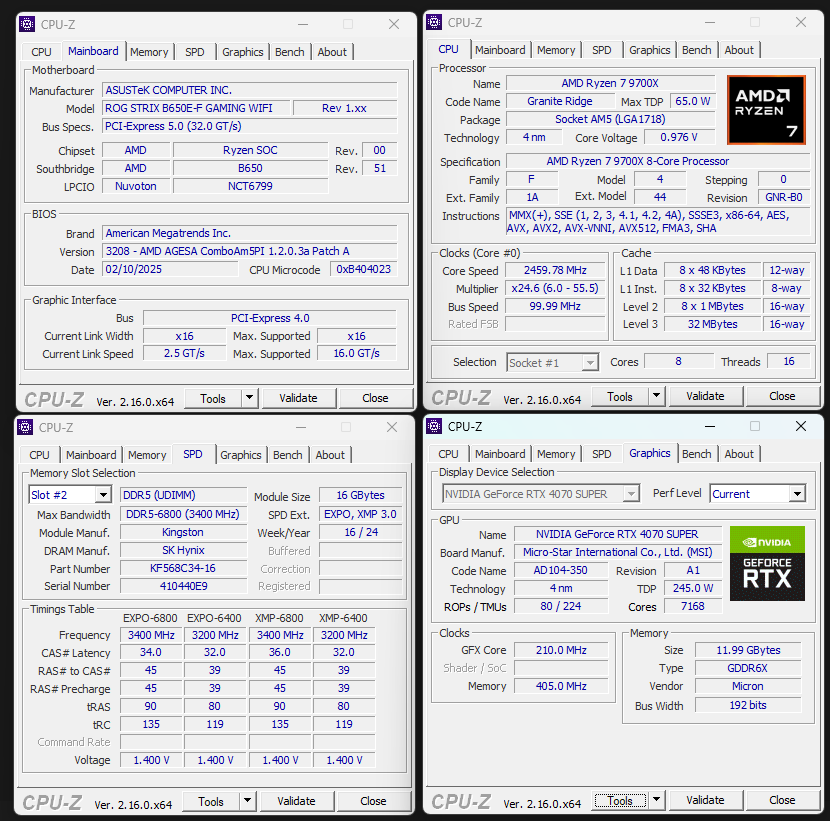
What is your full system specs? You could have a 5090 but if your system is not balanced, even having a 5090 could yield you ~3080/5070 results. Raw power is not the only solution.
I will have to check the power specs, but I believe you are correct. It runs more efficiently on less power and runs definitely cooler when I compare temps between my two machines.
The 5070 TI I think is a very solid card….
Trouble is the damn price…
If it were a $600 video card, it would be a good bargain. Even if you could find it at $750.
3 Likes
I got lucky - picked one up for MSRP ($749) at Microcenter a couple of weeks ago.
Very happy with it - plug & play SLM basically 24/7 since then without so much as a hiccup.
You did get lucky!
Good job!….it’s a solid card and at that price….reasonable.
I shopped for two weeks before I found one….i paid $800. Too much…but it is what it is.
Mine is running 24/7 as well. No problems
1 Like
It’s back-2-school season, d-vasilich… and your rig could benefit (depending on your current PSU, case, ect) from the huge discounts on 5080 SKUs for the same price ~5070/5070Ti.
1 Like
focus fix brings more sharpness consitency, but it reduces the level of detail somewhat, which is why I rarely use. More sharpness also brings Proteus “Sharpen” and “Deblur” but is invasive as every function you set, also “Rec Orig Details”, although all of them have their justification, but as soon as you use them even set only value 1 happens an invasive intervention, pixel shifts, rearrangements.
That’s why you have to be aware of user settings and I’m of the opinion that either you do without user settings it or you use it with a solid reason to achieve a strong change, i.e. set rather higher values or not using. I achieve the most natural look by using the model out of the box, without user settings e.g. Proteus has auto built in sharpens as soon as I scale it up which works very well.
I achieve the highest level of detail reconstruction by performing two or more SLm upscales. Let’s say you have a 480p original, then SLm 2x to 960p, then I downscale the 960p to 720p with Virtualdub + upscale the 720p with SLm to 1440p. To take it to the extreme: downscale the 1440p to 1080p and SLm upscale 1080p to 4k.
3x SLm is of course a horror workflow taking time and rather impractical, but I find it exciting to explore what is possible. It could deliver to hard/extreme results, depending on the source material, but you could also do steps between before giving SLm again, e.g. in Hybrid there are “Dehalo” filters.
1 Like
Thanks. I’m still a little confused. Can someone explain how you don’t lose quality?
For example, if I have a 1080p video and I downscale it to 480p outside of Topaz, I will lose quality. If I then upscale it back to 1080p outside of Topaz, it won’t be the same quality as the original because I downscaled it and lost quality/details. How is focus fix different? That’s what I’m not understanding.
Let me try…. anyone chime in if I am completely off on this
You are doing the process entirely within Topaz.
It downscale the media to provide a “fix” to the lowest base media values.
Which then makes it better and easier to apply further fixes to the media when it is returned to its original state….for the second pass
It does it in two separate passes.
An easy….all in one way within Topaz to use downscaled media to “fix”.
Unfortunately, that setting does not exist within SLM.
So the current workaround is to:
Run SLM at default settings
Then apply Proteus with focus fix and sharpening in a separate second run. This run is exceptionally fast and is not even close to the long runs of SLM. A few minutes only.
Yes when you downscale a source from 1080p to 480p you loose details, less pixels less informations, also into TVAI with “focus fix” is what I can observe…but when you can rid away blured sections, for some people this could also be also a quality gain, everything is always a compromise. But when there is a better way to rid blure away it can be the better solution.
I think the more a model does reconstruction, the more a low/moderate downscale is acceptable, but I don’t like generally doing on sources..ok when it’s washed out a and to large I did it already, to make it smaller and sharper, I used spline downscale (I think Hybrid has Spline64, tends to Halo but this i what i wanted).
1 Like
I will let folks know my experiment results.
I have a bunch of VHS and VHS-C media that the transcription service that I used promised more/ better results to upscale to 1920x1080 HD using their “superduper special upscaler.”
I’m going to take one of these videos….
Just run starlight mini on it, even though that HD dimension will take even longer. Then run Tommy’s method with Proteus on it
Then take the original 1920x1080
Down scale it to 720x480…. in Avidemux or Handbtrake
Then run starlight mini on it… default….then Tommy’s method using Proteus in a second run.
I’m also going to have that video transcribed to its original dimensions….
And do the same thing with SLM and Tommy‘s method
Then compare all 3.
I will let you know.
4 Likes
I have a similar project: about 15, 2 hour, VHS tapes. Been waiting for TVAI to come out with something that can give a result that is objectively better than the original.
2 Likes
When can we expect a new beta or alpha? We’ve been eagerly awaiting a faster version of Starlight Mini for months now. Will it ever be released? This model was the reason I renewed my account. I renewed my account on May 9th, three months ago now, hoping for a faster version of Starlight Mini. It’ll soon be 100 days without anything concrete. I now regret not waiting to renew my account. What ever happened to Topaz? Why hasn’t anyone spoken to us clearly for months? The question is simply, “Will there be a faster version of Starlight Mini in the near future or not!!!”
6 Likes
I have spent the last three hours reading up and watching videos on video transcription from VHS……
Voodoo, black art, equipment you can’t buy anymore, and have to go to eBay, time based correctors, LSI logic chips, OBS open source software….
I mean, my brain is absolutely toast right now.
One guy was telling me in a long drawn out method how I needed to build a Windows XP machine to make it all work. Go figure.
You would think someone would have developed a very simple and effective way to acquire a top quality VHS file into digital format so they could be upscaled and enhanced with all this artificial intelligence “newness”.
All the transcription services are “different” with their own hodgepodge together systems for making transcriptions…. There is no standard.
Some give you a very good product….. others can give you a picture that can be viewed and that’s about it.
I asked a simple question in one of the old time video conversion Foums dominated by these “voodoo experts…”
Why not just copy a VHS to a DVD using a good cheap DVD/VCR Recorder combo…. Then use Avidemux to combine the VOB files from the DVD produced….then import that base mpeg into a modern artificial intelligence video enhancer like topaz video AI. Seems like a much simpler process than trying to find a string of used old equipment that can’t be supported and all these complicated hookup methods.
Either my question was absolutely preposterously stupid, which certainly could be the case….
Or these guys prefer their black art voodoo hook ups to something simple.
Anyway, I got crickets for a response.
2 Likes
I do it very simple and get a good source video with correct audio synchronization. VHS VCR → MINIDV camcorder with end-to-end digitization to DV format → pci-e card with DV connector. I spent 100$ on all the equipment.
1 Like
I think capture cards are outdated, maybe try soemthing like that going over USB
1 Like
I use this and a JVC S-VHS VCR to capture @640x480:
The iodata adapter costs a bit more than others, but the results are worth it.
1 Like
