I’m using the latest, maybe I should go back to 4.2.2
I’m going to 2nd this sentiment as crippling and eventually killing multi-GPU support is a problem as I’ve purchased several licenses with this feature including the one I am on now. Not sure that stuff like this is legal to do in the middle of a license period.
You guys also keep releasing versions that are just broken. This version here is just broken. I always kick myself after I touch the update button. First video I loaded I can’t even scrub the timeline and it’s the same video I was messing with prior to updating. Whatever your testing methods are are in serious conflict with your release schedule. This is really giving this product a bad name.
4 Likes
I actually expected them to grandfather in existing users, and all new users have to go Pro for multi-gpu support. And I don’t mean a single license but as long as they own the product including renewing license. Otherwise it is flat out bait and switch.
Add me to the long list of people caring about the models worked on, and most importantly their speeds. Since 3.x I have gone from 15-25 fps down to single digits on 4k movies depending on the model, and as low as .3fps. I have tested a few other products and they still score 15+ fps on all their models, but they do not have the ability to customize like TVAI does, so it is still the superior product in that vein. I do like the new timeline, I think that was a great addition as the old one really had no to little timestamps.
IMO, either you are a professional tool for advanced users, or you need to put out a separate product dumbed down for normal users with single click non-adjustable models at a much lower price point, and then concentrate on making TVAI a solid product instead of trying to ham fist ease of use for basic users into a advanced users product. As such, I think TVAI should BE the pro version for the same price point we currently pay, then the 1-click product (multiple models but just 1-click) around $89.99 which would be competitive. Probably want to do $89 for lifetime, and lower prices for yearly. I just think separating the two is really needed at this point, because throwing in the ease of use is just breaking our existing flow every other release.
4 Likes
Well if they’re going to change the license to strip mGPU, they will change it to strip perpetual use of your last purchased version. I know what I signed on for when I purchased my last license, and I don’t plan on purchasing another cuz all they do is fumble around with the UI and strip things away that actually matter.
3 Likes
But what the hell is this setting doing in the middle of all the ones we use all day long.
Who wants to add some damn grain again in 2024 ?!? Especially in an application that is supposed to clean it !
We’re not talking about noise to help the model, no no we’re talking about putting sand back on the film
Another completely absurd choice, I applaud ! 
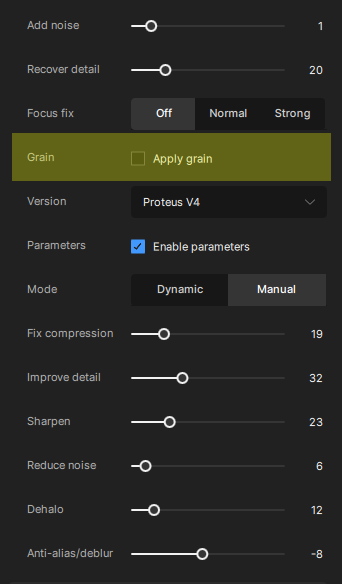
There’s believers of that in here. I probably wouldn’t mind it, if I knew 50% of the final file size wasn’t from grain/noise.
An old movie originally shot on film stock will get comments like, “plastic looking,” and “fake,” because peoples’ minds are expecting to see grain, especially if it’s a B&W film. A classic film without grain will seem as out of place as a 4k shot on digital film with grain added.
True. Topaz would never be my first choice for adding grain though (I prefer other software with more customizable options). Even if I did use it, it would make more logical sense to have it at the bottom of the list than in the middle (it’s typically the last effect I’d add after the various enhancement steps).
2 Likes
I am not stupid, but that ocurrence should not lead to put “grain” parameter in the most used ones
It’s me.
There’s so many WWI videos from British Pathe (for example) that are horribly compressed, but we need them for our production anyway.
Adding grain helps smoothing out results of compression artefacts removal.
1 Like
So, one user, any other , like if so, we will count you
1 Like
I’ve given up trying to figure out why things go where they go in Topaz apps. Compared to all the things that don’t work right, where things go is the least of the issues.
1 Like
Grain is also an absolute necessity for me. Used skillfully it creates a feeling of more sharpness / a kind of “skin pore visibility”
1 Like
And instead of making the models work faster they becomes so slow you actually need to buy an extra GPU-card.
Buying a new card is not enoug… You also have to buy a license to use it.
I don’t think I will shell out more money for this.
I also don’t think we will see any improvements on the models.
Well… We got Rhea…
I was almost glad I didn’t see an improvement in quality over Iris. I’m now not tempted to buy an extra Nvidia and an extra license.
And buying a new card is not fully usefull as the app. does not scale (well / at all) with GPU numbers.
You’ll also have to buy a super kick-ass CPU and octal channel RAM (and super fast + super big Nvme if you want to ouput FFV1 to keep quality before compressing it)
If I am doing shit, ready to ear advice !
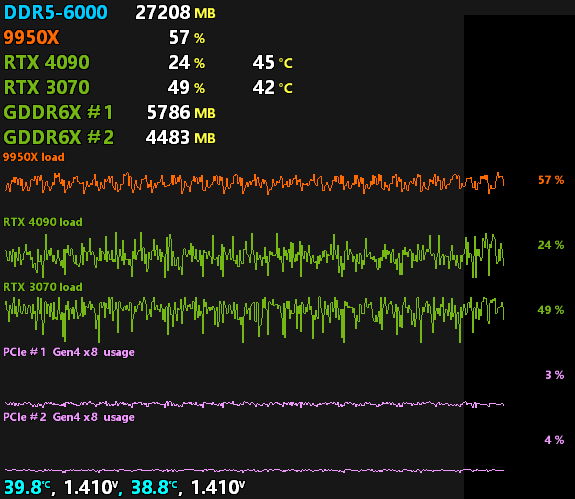
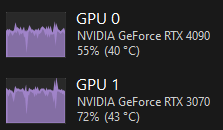
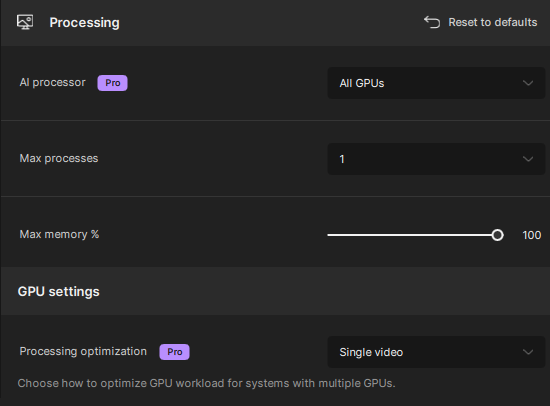
So I don’t know if it’s 5.3.1 relative, to me or anything else.
Grain has a purpose.
If used correctly it makes things look sharper and takes away some of the plastic look left by most of the models. I almost always apply grain at the largest size, amount 1 or 2.
1 Like
Be carefull, I am not talking about this

that add artifial noise to the original picture to ‘help’ the model
Do you really mean that ading grain (and not noise) also help the model ?
That toggle is undocumented on the on-over function, so … I don’t know
I was talking about grain - not noise.
And yes, adding grain can improve video quality when used correctly.
5 Likes
Ok ! Thanks for the info. I thought not, will give tries therefore 
I usually only use amount set to 1 and size set to max, occasionally I set amount to 2. Works best on MQ HD sources, for example 720p to 1440p or 1080p to 4k.
1 Like
