Not understanding this If Nyx 3 is a newer model version then why did it not show up until I checked “enable previous model versions” scratching my head…
If “enable previous model versions” is unchecked, Video AI will always use the latest version of a selected model. In this case, your system was always running Nyx v3.
2 Likes
@tony.topazlabs @kyle.topazlabs
MediaInfo.txt (14.9 KB)
MediaInfo0.txt (4.7 KB)
MediaInfo1.txt (4.8 KB)
MediaInfo2.txt (9.7 KB)
MediaInfoTVAI0.txt (3.5 KB)
MediaInfoTVAI1.txt (6.9 KB)
MediaInfoTVAI2.txt (10.5 KB)
Media info is showing TVAI is Altering the Meta info.
Why not 3.3.2 with the fixes for ProRes?
Just done update to 5.0.2
The in app updater has this time problems to close the app.
I restartet the App click again on download/install and closed the App after that in order to continue…but this time TVAI didn´t restart after installation unasked as all the times of updating before.
Also i am not asked to remove old models.
I last did some files with just stabilizing and closed TVAI after it started the next video and just quit TVAI because TVAI doesn´t pause/resume on stabilization.
After the update and manually starting TVAI again there show a lot of red crosses at all exports:
The files already finished showed also the red cross i just closed them.
Those files that not yet started to export i did calculate again.
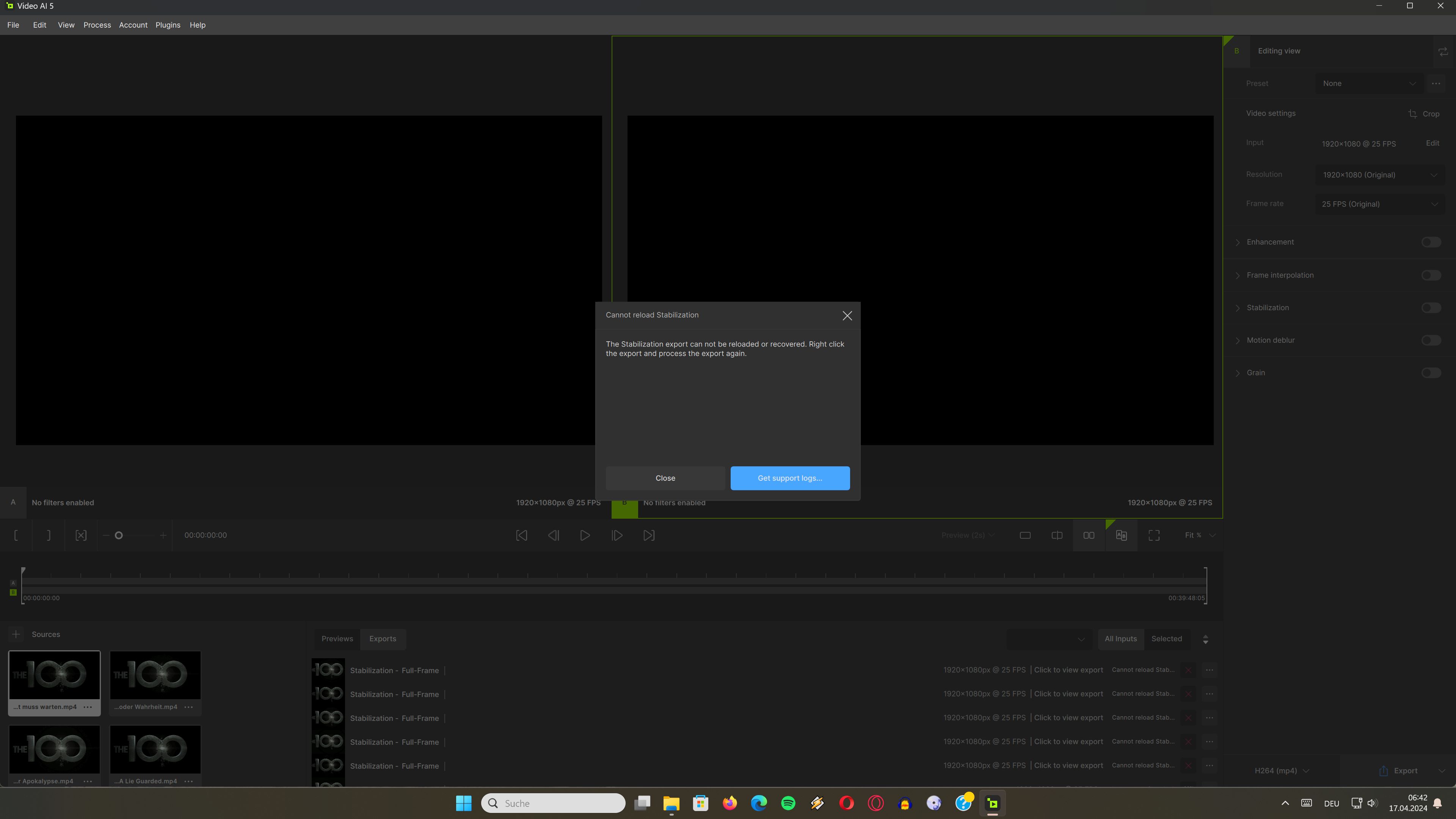
logsForSupport.zip (27.5 MB)
After update to version 5.02 - Benchmark does not work anymore!
1 Like
I did a bunch of testing on all the version going down from 3.4.0 where they removed the near magical quality vs compression ‘Auto Bandwidth’ function and replaced it with the very bloated High and very compressed Medium/Low.
Basically, every incremental version past 3.2.2 also incrementally increases the wait times. Since I mainly use Artemis and very rarely Proteus, this was the best version for me.
Do some testing based on what you want to decide the best version for you, but know the wait times will only get bigger and bigger past this version.
3.2.2 is the quickest version and previous ones have the same wait times since I bought the license in late 2022.
Thanks. But this applies to compression in GOP codecs, right?
I always use ProRes for further treatment, like editing and color grading.
Hi all!! I want to share. I installed 5.0.2 for testing. Worked great!!)
- Original file HD 1280 x 720. Installed - 2x Upscale, after the start of export, without pressing pause, closed the MBP lid and let M1 go to sleep. I opened the lid and the export continued and output the file.
- Source file HD 1280 x 720. Installed - 2x Upscale, after the start of export I clicked on the “Pause” button and without leaving the program I turned MBP OFF. Then I Enabled MBP, Topaz loaded, I clicked “continue” and the export continued. In the panel on the right, instead of the previously set resolution - 2x Upscale, the inscription 1280 x 720 (Original) appeared, I did not specifically pay attention to this and continued exporting. As a result, the final file was output in the resolution I required - 2x Upscale, as I originally wanted. Don’t let this scare you, everything will be fine in the end, just keep this in mind. So you can safely turn off your computer without leaving the Topaz program, and after turning it on, everything will continue if you don’t panic and immediately write to support without figuring it out.)) Health and good luck to everyone!
Firstly, I wanted to say how the models in 5.2 are so much better. I can really see a difference in how noise and artefacts are being handled. Much better than before with less of the strange effects as before 
Can we have an option to clear previews. These take up drive space and need to be loaded when a project is loaded. I personally don’t need to refer back to earlier previews. I just want the current one I’m dealing with. Therefore can that be an option?
Can we also choose to have either a previous project or a new one when opening VEAI ?
I spoke too soon. I’m on Mac and having the spinning beach ball appear when I load a project. I think the previews might be the culprit. I can’t get the app to load at all. I’ll need to trash preferences in OS.
Just did that and project loaded. However, I think that points to a problem somewhere. I believe that old previews need to be erased when the program is closed.
probably in any of the you are right for Artemis, but you miss really some newer models and blue ray is easy . Yes Nvidia 4090 compared to 3080 looks nice, but i see the intel cpu still being used and beiing the bottleneck
I used to be able to do a 4k movie in about 1-2 days, now it takes 4-10 days. The models have all gotten much better, but at the cost of 4-10x more time to process? Take for instance I have a 4k Dune I am running JUST Aion v1 to bring it to 50fps and what I used to get with chronos 3.5 - 6fps doing is now running at .5 - 1.3fps with Aion. Even using chronos again it is still half the speed it was, so I feel what you are saying here. Everything after 3x has been a weird ride of ups and downs. As each enhancement to the models improves, and new models come out that make older models superfluous, that is exciting. Each version the UI gets clunkier and more confusing and the models all slow down, which is sad.
I think in general this is going in a positive direction, they are slowly figuring out what UI they want, how they want displays to go, and more, but this has all been at the cost of the performance of the app, and there is NOTHING more important than the actual functionality of the app, how quickly it works, and having that tuned. The UI is quite literally unimportant compared to the app doing it’s job as fast as it can, and people even use NO UI and just CLI. This needs to be Topaz’s #1 priority IMO, get the app working as fast as it used to, because at this point if it takes 14 days to transcode a movie, this app will no longer be used, much less worth it. Please start to focus on making this thing WORK again guys. Not only has it slowed down magnitudes compared to older benchmarks, but I have seen the errors in processing videos SKYROCKET since the later 4.x versions and continues to get even worse in 5.x.
I think the possible reason this is a big issue is Topaz is not releasing their app in a normal devops manner. They release every release like it is more of a incremental preview build, with no actual stable and tuned GA releases (see 5.0, 5.1, 5.2, et al) so people can use a full working and blazing fast GA release to do actual work in and test and move forward in the increment builds to test and work things out (see 5.0.1, 5.1.3b, 5.2.44) and the like, so we are all stuck on basically preview models and never a solid release. Please give us a release, I don’t care which UI 4.x or 5.x if that is what you are going with, that has the models and app performance tuned with SPEED brought back into these models. I cannot stress enough how little anyone genuinely cares about what the UI looks like when the actual app itself has become a slow clunky mess.
That said, I think the latest versions UI is more streamlined than the previous, the green was a VERY odd choice to randomly throw in there, feels like RGB lighting on a pc case instead of a video application, and the new icon is about as unassociated with what this app does as you can get, but the rest is pretty smooth and dynamic feeling, if not a little too open so menus blend into each other, but otherwise decent. But that performance USING the app, is just really really really bad now. I really can’t stress this enough. The video I would use each release since 4.0, a music video called Legends Never Die, has gone from a transcode which takes about 30min to an hour is now up to 4-5 hours to do, on the same hardware (AMD 5800x, 128gig ram(4000mhz), and a 3080 with NVME storage) and wwaaayyy worse on my junk test box which has a crusty old i7-6500k with a 3070, takes a DAY now. Please guys, can we get some concentration on performance please?
3 Likes
Yes I noticed too that Iris models now behave better as proteus already did iris lqv2 when zooming in created artifacts while protheus did not. in v5 it is behaving good so something changed
Why in v5 the file sizes have been x2 with the same preset i was using on v4.2 is it a bug or something weird going on
My output is h265 dynamic medium mp4

OH NO!!!

6 Likes
Hi is it possible to download offline models for v. 5 ? I’d be particularly interested in the Proteus module.
Yes, go to the File tab and select the Model Manager and make sure the models you want to use are checked. This will force them to download to your system.
1 Like
I feel the same way about what builds make it to the public. I signed up to be a beta tester thinking I could help reduce the amount of issues that go into the final release, but they don’t seem to care very much.
Usually I expect a beta build to increment until all the reported issues are addressed, or at least promised to be resolved in the future. What I’m seeing here is: a beta gets released, about ten issues get detailed by the testers and maybe one will get fixed. Half of the time that one fix is only in the final release. No beta build ever saw it. Then everyone reports the same issues but on the final release.
Yes. I’m exaggerating a little. When beta testers report that this or that won’t run or crashes, those get fixed as fast as possible.
1 Like
I am also a beta tester, and I do the same. I think there IS listening, for instance I have provided screenshots each build for awhile for Frame Interpolation being broken for high speed or very busy scenes. They finally released Aion which does indeed fix that issue (mostly). So I KNOW they are indeed listening, but I am under the impression they have their priorities twisted perhaps? It is really hard to say, as for all I know they have a single UIX guy and that is all he/she does and that is why so much change in UI gets pushed, and who knows how many people they have working on the backend, but to be honest I am not completely sure. I see things come out like Prores support and the like which tells me work on the backend IS being done, but then I see all these long standing issues that have not been touched at all, but new models coming out, new models that are untuned and slow… and then the next model comes out and the previous model was never tuned or corrected. I get new versions instead of fixes, but each new version comes out beta slow… which is not how it should be when you release to the GA.
As usual, don’t get me wrong, I really appreciate the work these guys do, and there is a lot of work that we see. Constant fixes, constant releases, so unlike other companies we have our finger MUCH closer to their development, where most other companies could care less about letting the community know and they just release what they release when they want to do it, and that is fine for large corps, but not smaller ones.
Again, I just think priorities are incorrect, and they need to put serious work back into the backend and speed of this app because it has gotten so slow, I am about to load older versions back up just to get anything done, and that is something that them hearing should raise ALARMS, as I am not usually one to complain, just let report errors.
2 Likes
