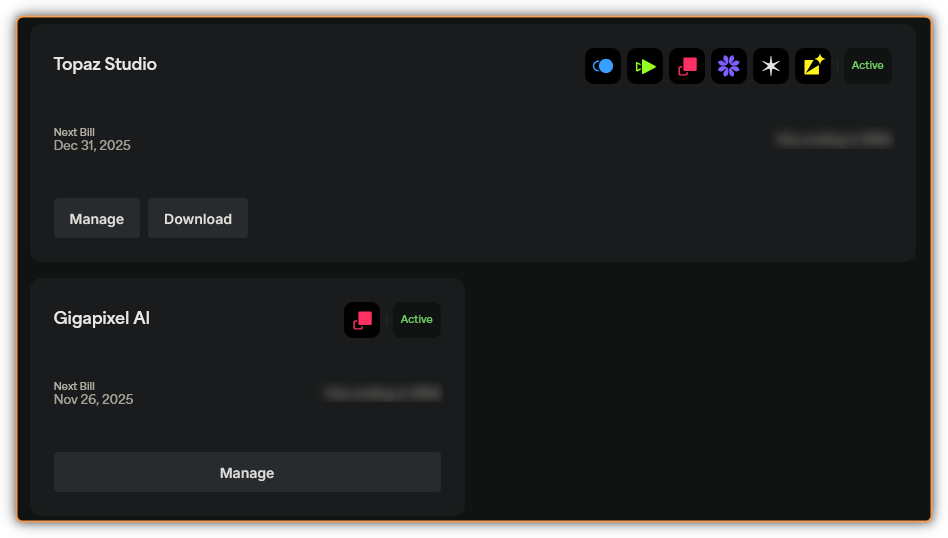
And the deadline is set, too. That’s why I wonder if Gigapixel one is also needed, especially because it was cancelled once, and not by me, IRRC. Well, there’s still a 1.5 month away, so it remains to be seen.
Your screen appears a little different to mine, My screen, says Topaz Studio next bill Feb 14,2026 which was the original expiry for My Gigapixel subscription and My Gigapixel and Photo AI aren’t saying Active anymore My screen has both applications listed under Legacy Products and are now saying Owner.
Yours is saying Topaz Studio next bill Dec 31, 2025 and Gigapixel next bill Nov 26 2025 which, is different from My on screen information where by, mine has Gigapixel down as Owner yours is still on Active.
Topaz Studio is yours nothing to worry about there however, this looks a little odd to me because, of the differences between our two Accounts so, in light of that My friend I would suggest contacting Topaz Support and simply ask the question.
I don’t know what happened, it was working yesterday, then suddenly it stopped working. When I opened Elements, there was a screen that said that there was a problem with the program. I didn’t pay it any mind because it was working.
Well, it stopped working.
Now I have Elements 2022 on my computer, and it works on that program, but not on 2025.
That’s why it’s probably still going through transition phase stuff, as my second Gigapixel cancellation (made by me at the time to test, was marked as ‘pending’) was possible to re-activate, and you can see the result.
I have all the ‘legacy’ apps under ‘Owner’, too.
I think it’s not the intended (by Topaz team) result, indeed.
I looked online and it seems PSE doesn’t have a File > Automate like Ps does either. I assume that means the Topaz Photo upscaling features can’t be used in the PSE plugin b/c Adobe doesn’t support upscaling in filters.
What do you plan to do?
I thought the older PSE releases were perpetual & the newer ones are ‘leased’ for 3 year periods.
I believe it was said in the early days of this transition that it would take “ a few days” to complete. Well, my account has been “Pending Studio transition” for over three weeks now. In addition, despite receiving two emails from Topaz Labs, one each extolling the virtues of Gigapixel and Video, since 5 September, I haven’t received a single word from them about this transition. Not a word. I find it hard to believe I’m the only one in this position, so can one of you please give us an update of where we are?
If you own expired upgrade licenses, you’ll be receiving a Studio transition email shortly. Everyone else should have received an email by now for the transition (unless they have opted out of Topaz emails).
@PaulM I am DM-ing you as we see on our side you cancelled both your renewals twice (7th and 11th), and this means everytime we ran the script since the transition, you are not on the list to be messaged as you have 2 cancelled renewals. Ill DM you to see what you want reactivated and we can run the script manually.