I just prefer to scan down and see the relationship between all the settings. That’s how the application used to work. It makes sense. If you don’t need it, fine, they could design it so you can always collapse the views. I actually preferred the separate applications! They ran fast, they were simple, they did a great job with everything I threw at them. Did I have to think a bit about which one to try first (since Denoise had some deblurring, and Sharpen had some NR)? Sure. IF they had implemented the latest versions of Photo AI well, without turning the interface into Frankenstein, I would probably accept it better. What I do not have time for is the endless perusing of release notes and testing and trying this and sending samples of that. I have spent a lot of time with Topaz via email, as well, and I just don’t get good answers. One Topaz rep told me that if they had the staff that Adobe has, they could fix these problems. Wow~ And yet, they are wasting dev time on producing products that, your personal support aside, are making a lot of folks unhappy with very specific reasons. So again, if it works for you, fine, but please don’t camp out here to throw stones at folks with legitimate beefs. We are not idiots. (And yes, I have been with Topaz since its first products. Really, Topaz has had a crazy quilt of product releases and cancelations in a fairly short time.) We are experienced users of a variety of applications from a lot of developers, and we have a pretty good idea when a train has jumped the tracks. It is time for Topaz to stop blithely repeating where we can download old versions and start doing right by its customers.
Thank you for your deep insight …
I like the ability to easily turn off one item, that cropped images displayed correctly (that is cropped) and that when, for example, denoise is changed items such as sharpen are shown as part the displayed update without closing the control box.
As I mentioned int he 2.4.1 thread some images still have a “pixel shift”
My pleasure!
Facts matter and the fact is achieving 100% satisfaction from all clients is an impossible goal. Topaz is attempting to continue to develop and grow their applications, with that comes change, just like we experienced with PS over the past decade or so…
What is the status of the right panel redesign/fixes?
I don’t see that in the current Changelog, so am remaining at 2.3.2 for now until addressed.
Can’t use PAI for Ps YT tutorials.
Thx.
Don’t give up now! Everyone makes a wrong turn now and then, and 2.4.0 was rather bug-laden, but 2.4.1 fixed a little of that, and 2.4.2 fixes most of the rest. This is not being done to make life harder, but to provide a truly more-capable product. I was frustrated too, and had to go back to 2.3.2 for while. Now most of my Topaz processing will be done in 2.4.2.
…Sam Brown
This is much, much, better. Admittedly, I did not have any of the basic stability issues that some people did, so those are beyond the scope of my comments. For me the otherwise-unusable 2.4.0 and 2.4.1 did run smoothly and installed easily.
This one allows a true preview, turning enhancements on and off to see their effects, and seems to run faster than the others.
The only remaining bug I’ve found is that Preserve Text still does not work at all. With some settings it slightly modifies the way the text gets mangled, but nothing changes it much. As is was in my posted example on 2.4.1, the noisy lower-res original was not pretty, but quite readable and “normal” looking. The output is just like it was before Topaz implemented this feature.
Recover faces seems to work as well as it did prior to 2.4.0. The complaints of soft results seem to stem from recovered faces possibly not being sharpened when the rest of the image is. I am not sure how or if this could be done, but it would be nice.
I still have 2.3.2 as well as 2.4.2 on my computer (MacBook Pro M1), and will use the older version for images with text until the this fixed. Most images that need Topaz processing will now be handled in 2.4.2 – thank you!
…Sam
Awesome!!!, just awesome!!!  . As expected, the same problem as with version 2.4.1. What are you devs doing? I exposed the problem 2 weeks ago for the previous version and you didn’t fix it. It’s a disgrace. Especially since the problem in question is identical with Gigapixel 7.0.4 and 7.0.5.
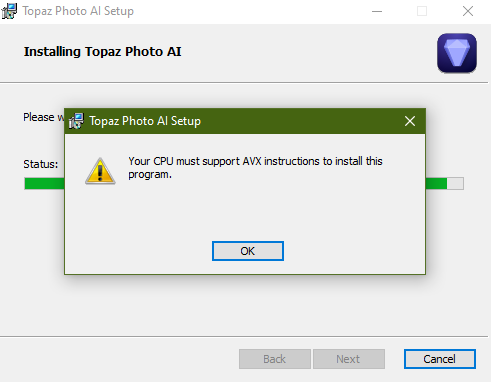
I put back my CPU info
https://ark.intel.com/content/www/fr/fr/ark/products/186605/intel-core-i9-9900k-processor-16m-cache-up-to-5-00-ghz.html

And details in CPU-Z

Please correct quickly or at least provide a workaround.
I’m not really sure what you mean but you can move the Enhancement panels to where you want by moving one of them (e.g., underneath the Add Enhancement panel) and they stay there, even after restarting the app.
Love this new version with the on/off enhancement preview option! Thanks, Team!
Appreciate your reply, it basically renders what (some at least) would like to see. Cannot understand why it’s so difficult to have at least 2 of the settings shown at the same time (noise & sharpen). It was there before, and most everyone was pleased with it…why not now?
Do I start sensing that it’s more of a forcing thru one idea, and if you are not happy, go shopping elsewhere?
Basically, having those settings shown at the same time cannot bother anyone, however, not having it, it does.
Not true. Give people a choice between the old interface and the new one and everybody’s happy.
hi,
ok no more crash.
But still too many artifact and face recovery problem.
I hope Topaz fixes it in 2.4.3 and doesn’t move to 2.5 with another useless new feature still having artifact issues.
LrC is setup so one can choose whether only only one setting is open at a time or not
Not using LrC, so I’m not sure how that relates to TPAI?
Just have an option to either have only setting is open at a time or not. Supporting 2 different GUIs isn’t really practical
Was it practical up to 2.3.2?
I love how you rendered the software totally useless for me starting with v2.4. Now three releases later it still doesn’t work. If I load 500 raw files to do a batch it will usually crash after doing around 100 of them. I am running on a brand new i7-14700 system with 32gb ram and an AMD RX6600 video cardwith 6 gb of ram. Version 2.3.2 works perfect. I have read here that I am not the only one with this issue.
Is it possible to install two versions of Topaz Photo AI on the same computer? Pc or Mac. I would be interested to know if is possible on a Pc. I’ve thought of trying it but thought one version would overwrite the other but it would be good if you could do it and allow users to choose which version was best without constantly uninstalling and reinstalling the software.
Regards Bob.
That is, its not practical to support 2 completely different GUIs in one program. 2.3.2 only supported one.
