I suggest that anyone with a Windows OS computer make a Media installation drive on a USB stick. Get a new or format a 16GB USB thumbdrive and go to Download Windows 11 (microsoft.com)
Use the second option “Create Windows 11 Installation Media” and download. Run and follow instructions. If you have a windows failure because a file gets corrupted, you can repair or even install the OS again. Otherwise, (if you only have one computer) it will be a trip to a computer store and a charge to re-install. The same goes for Win 10 but a different download page.
If you have a C: drive backup then you can recover the drive after you have the OS running again.
Reminder for those who need to “get right with Topaz” to proceed with your updates or renewals, there is a 25% off sale going on for the rest of the month, as well as a Gigapixel pre-order sale.
Doesn’t sound quite right, what is the issue you are facing? Windows has nothing to do with the Mac AppStore.
The problem with MacOS is you need to allow non AppStore apps.
Select “Security & Privacy” from the “System Preferences” window.
Select the “General” tab, and select the lock in the lower left corner to allow changes.
Enter your computer username and password, then select “Unlock.” In the “Allow apps downloaded from:” section, select the radio button to the left of “Anywhere.”
Wasn’t there a photo bundle before ? I was surprised when I extended my upgrade on Photo AI that all other apps Gigapixel/Denoise/Sharpen AI weren’t part of the upgrade. And I thought they were discontinued for good for that reason.
Good to see a new Gigapixel but having to pay again. But I will only upgrade if we have an absolute banger upscale with realistic fine details in all domains from low res/overcompressed images.
Just like the the failed 2.1.4 update to Photo AI, v2.2.0 also crashes.
2.1.4 crashed for me whenever trying to process more than 1 image.
I was able to do 5 images, then it crashed when I tried 6.
Saying I’m disappointed is an understatement.
| never had these kinds of problems with earlier versions.
There was a bundle offer for Black Friday a month ago (which ended of course). Some people expressed that they would rather be able to pick and choose, so here we are this month
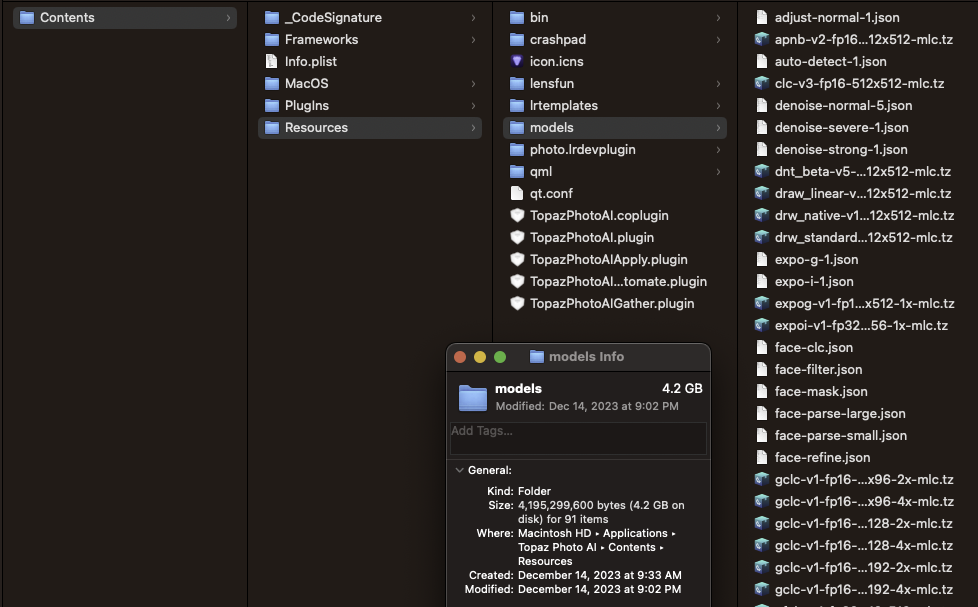
With my installation of v2.2.0, the disk space used by the AI models grew from about 7GB (with v2.1.2) to a whopping 17GB now. Why has the disk space requirement for the AI models increased so dramatically with this release? I’m talking about this Windows folder:
What I figured out after posting is that the files that were downloaded during the v2.2.0 installation totaled only 9.09GB. The other older files had been building up in that folder over a period of a year, every time I updated the software.
I decided to remove all those files that preceded the v2.2.0 download, and everything appears to be working fine. I’ll report back if anything malfunctions.
On WIn10 I have 9.67 GB/ 139 files. Some files are dated 11/30 (V2.1.3) and the rest are dated 12/14 (V2.2.0). Don’t really see any real duplicates across dates.
Hi all, My use of Topaz Photo AI is limited to denoise, sharpen, restore faces and clarify text. I usually import a Raw file to basically clean up the image and then save the file as a Tiff. I also create giga pixel, high detail images that I save in Tiff format. After running through Topaz, I import the Tiff image into Photoshop and edit it in Photoshop. For me this gives me the greatest flexibility of output.
The problem I have noticed is when I try to import a large Tiff file into Topaz Photo AI. EG: I created one highly detailed image around 19,100 x 16,400. When I try to load this image into Topaz Photo, it just crashes. Is there a size limitation for imported files? Please advise. Thank you.
From within TPAi, install would not proceed after downloading. Yes, I had clicked on the install button. I had to go to my downloads fold after closing TPAi and install from there. I didn’t know there was an “Unlock” feature, so I will have to check that out. Thanks for the reply.
Yes, this is a MOST IMPORTANT bug to fix. I can think of no reason why 16-bit Tiff files created in C1 should emerge desaturated with a changed colour balance too, out of TPAI. Everything else pales in significance if the original is ruined.