Hi everyone,
I have a question to Starlight Precise users. Is anyone else using a computer that is below the official system requirements for SLP, specifically a graphics card with less than the required 12 GB of VRAM?
My GPU is an RTX 4070 with 8 GB of VRAM, and I have 64 GB of system RAM.
Starlight Precise delivers incredible results with this setup. However, the rendering speed is extremely slow, averaging around 0.06 FPS when processing DVD footage and upscaling it to 1280×960.
Does anyone know of a way to speed up the rendering process, even slightly with similar graphic card?
I’ve tried using SLP Launcher Lite and the new Beta version of Topaz Video AI, experimenting with different maximum memory settings, but none of these attempts has had any impact on rendering speed.
My GPU’s VRAM is almost constantly maxed out almost to 100%.
Does anyone have any suggestions on what else I could try to improve memory management and increase rendering speed?
Hi,
SLP Lite was originally coded with 50xx GPUs in mind, but I’ve just looked into it and realized it’s possible to implement this for 30x and 40x series cards as well; I can compile and integrate the Triton kernels for these GPUs. The speed boost is consistent across all of them since they use SDPA, and the other settings remain the same. However, while the CuDNN path is optimized for maximum speed on 50x cards, the performance won’t be quite the same on 40x and 30x models. Still, it will generally be faster than Topaz’s default settings—so, in my opinion, it’s better than nothing. Of course, since I don’t own those specific GPUs, you’ll need to run the actual tests; if any issues arise, please send me the logs so I can fix them. Since SeedVR2 and SLP share the same architecture, performance relies heavily on CUDA kernels; essentially, the GPU with more and faster CUDA kernels delivers better speed. That’s the secret: CUDA. In fact, the future of all video upscaling applications lies in CUDA-based technology—which is why I’ve been saying the Mac era is over; for the future, stick to Nvidia GPUs. This is just a prediction regarding the future of the technology, not an advertisement for Nvidia.
Thank you very much for your comment and detailed explanation. If you could implement SLP Launcher Lite for 30x and 40x series cards, that would be great. Meanwhile, I plan to do further tests with latest SLP Lite version, using different settings for chunk.
I can run SLP on an 8Gb RTX 3070. But it’s kind of like watching grass grow.
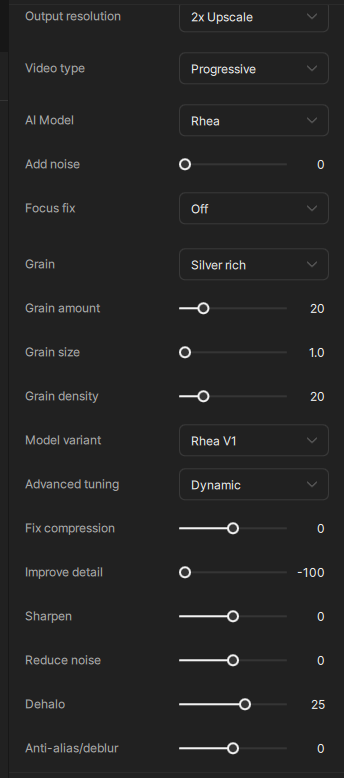
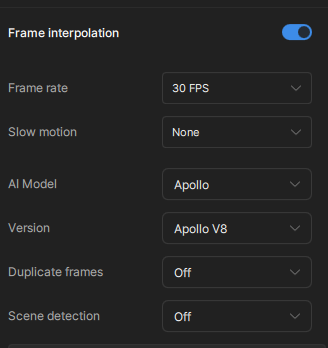
It is actually possible to speed things up a bit by slightly compromising on quality; for instance, if the frame rate is 24+ fps, reducing it by 50% doubles the speed, and if the video dimensions are large, reducing them by 50% also increases speed—along with selecting the “minimal” SLP setting for the output. Afterward, you can use Rhea to simultaneously upscale by 2x and double the frame rate.
It is actually possible to speed things up a bit by slightly compromising on quality; for instance, if the frame rate is 24+ fps, reducing it by 50% doubles the speed, and if the video dimensions are large, reducing them by 50% also increases speed—along with selecting the “minimal” SLP setting for the output. Afterward, you can use Rhea to simultaneously upscale by 2x and double the frame rate.
Rhea 2x setttings: