This reply is very confusing …
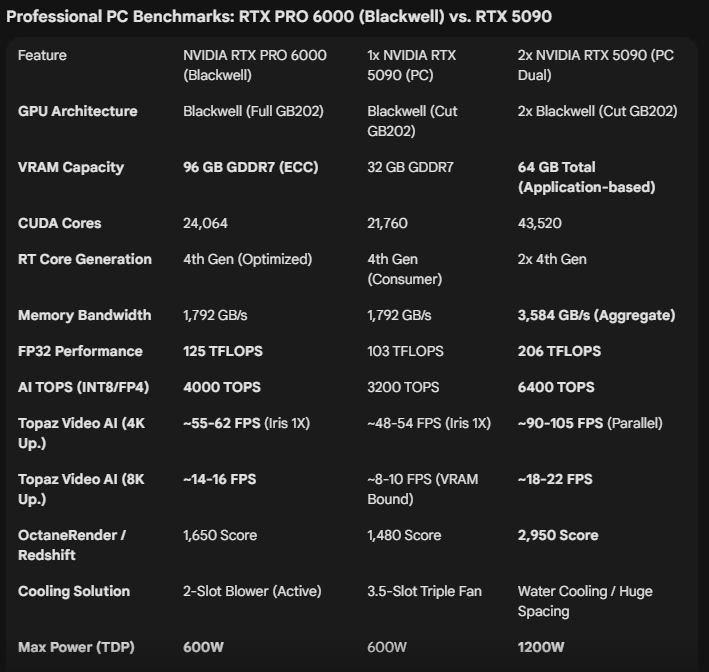
Filing the VRAM (dedicated one, shared is not purpose) does not mean improved quality
The difference surely happen because of the model loaded FP16 or FP32
FP32 doubles the amount of VRAM needed where FP16 “should” use TensorRT improvment with VRAM compression
On the paper the 96 GB Blackwell would only use gigantic tiles instead of smaller ones. The percpetual difference is slim (junction betweeen 2 tiles)
CUDA cores are only here to feed TensorRT, TensorRT are the heart of the quality process.
If your 4070 Ti is agonizing, be sure the computation are drastically degraded
I don’t know, I can’t explain it technically, I just see what I see. For me, a 30GB+ GPU RAM encode simply delivers a better image, but I don’t know why. Logically, it’s kind of strange that more VRAM doesn’t result in faster speeds and also not in better quality, so then more Vram is useless? For me, something doesn’t add up logically.
With the beta version in particular, there is something special to note that I have already reported on: during the ongoing encoding process, what has already been freshly rendered changes and improves over time! If you look at what has just been rendered and then look at the same frame again an hour later, you will see a difference in quality. At first I thought it was just my imagination, but I’m sure something is happening.
Don’t get me wrong, but I think you’re nearsighted; the image can never improve, the file is ultimately fixed. Video quality isn’t related to VRAM; it’s entirely related to the model used. VRAM can only increase speed, that’s all. For example, if there’s insufficient VRAM, processing time increases because tiles are being used; if there’s sufficient VRAM, processing speed increases because tiles aren’t being used.
Look, in Topaz, we don’t see the settings, so we don’t see how it handles the fine details, but in SeedVR2, we see all the settings, so the situation is fully understood. For example, if the video output is large, my GPU VRAM isn’t enough, so I have to enable Tile to avoid errors. Then the processing speed decreases because it has to do more processing. Topaz does the same job, but because it does everything in the background, nobody sees these processes, and another disadvantage is that it makes automatic decisions, it works like an autopilot. But in SeedVR2, everything is manual, so I adjust everything myself. Actually, this is better because automatic settings don’t always give good results. If there was enough VRAM, then there would be no need for Tile, or even if it did, it would process faster by using fewer tiles, so the FPS would increase. But when the VRAM is low, it has to allocate it to smaller tiles, so the FPS decreases due to more processing. But the quality is the same because only the model file determines the quality, VRAM only determines the speed of the process.
[17:33:13.714] ⚡ Total execution: 78.36s
[17:33:13.714] ⚡   └─ Video generation: 78.03s
[17:33:13.714] ⚡   └─   Phase 3: VAE decoding: 44.77s
[17:33:13.714] ⚡   └─   Phase 1: VAE encoding: 17.60s
[17:33:13.714] ⚡   └─   Phase 2: DiT upscaling: 15.26s
[17:33:13.714] ⚡   └─   Phase 4: Post-processing: 0.21s
[17:33:13.714] ⚡   └─ Final cleanup: 0.21s
[17:33:13.714] ⚡   └─ Model preparation: 0.11s
[17:33:13.714] ⚡ Average FPS: 1.91 frames/sec
Look at this example: Process 1 is fast because the input video is small, so upscanning is also fast because 16 GB of VRAM is sufficient for this process. However, since the output video is 3x larger, the VRAM is insufficient, so I’m forced to enable tiles for the third process, called VAE Decode. This makes it take a very long time. If I had 32 GB of VRAM, I wouldn’t need to enable tiles, and the time would be much lower; I would get 3+ fps instead of 1.91 fps. This has nothing to do with quality; it’s solely about speed. Topaz works on the same principle, it just doesn’t show these logs.
very interesting thanks, for me Topaz is a black box, I just could see with my eyes. Maybe tile is what I see can lowering quality? You can beat me up, but there’s simply a difference in quality. My current upscale draws 44GB of GPU RAM, and if I do that with only 12GB of VRAM, a lot of tiles has to happen, perhaps not without consequences apart from the tile speed drop, because those things have to be put back together again.
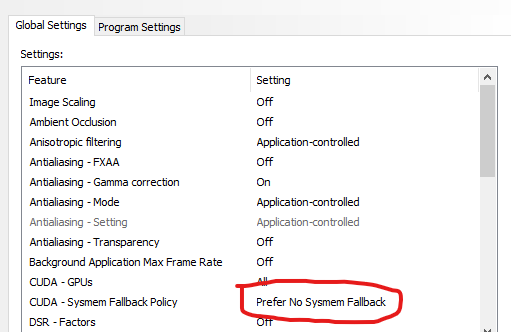
The biggest disadvantage of the overlay application isn’t just the slowdown; the second disadvantage is the seams, which are sometimes obvious and sometimes microscopic, but it’s impossible to ignore them, since two images are being superimposed. Make sure it doesn’t use Shared VRAM; disable it in Windows settings because using Shared VRAM means a drastic speed reduction. Make sure you do this in Nvidia settings as well, and also in the Topaz application.
That’s not entirely accurate as we know from e.g. TopazPhoto and Gigapixel that there the exact same generative model does create quite different results when you encode only a small tile/preview compared to when you encode the whole image.
If they use a similar approach at TopazVideo there might well be differences in the resulting quality depending on tile size or if tiles have to be used at all.
The problem with comparing preview with whole image is we also don’t know how many steps are used (and other factors) for generating previews compared to the whole image. They could be quite different, and Topaz have never been clear on what’s happening under the hood.
This is true but VRAM consumption only affect tiling, you may have better junctions between tiles, but that’s all
If tiles are very small, indee, it can appera in the global result, but I doubt Topaz Photo work with tiny tiles, doesn’t it ?
As I wrote, I see a difference with more VRAM, and when Starlight local was first released, there were at least one person who wrote the same, he also noticed a difference and wrote there are “quality steps” one just above 12GB, one above 16GB, one around 22GB and above 31GB.
So ensuring that shared memory is not used (system fallback) or lower VRAM settings in Topaz is exactly what I don’t want and I know shared memory slows everything down significantly, and the more shared memory, the worse it gets, but I accept this if quality is better. To be sure that this is all just my imagination, I would have to make a comparisons.

 (kiding)