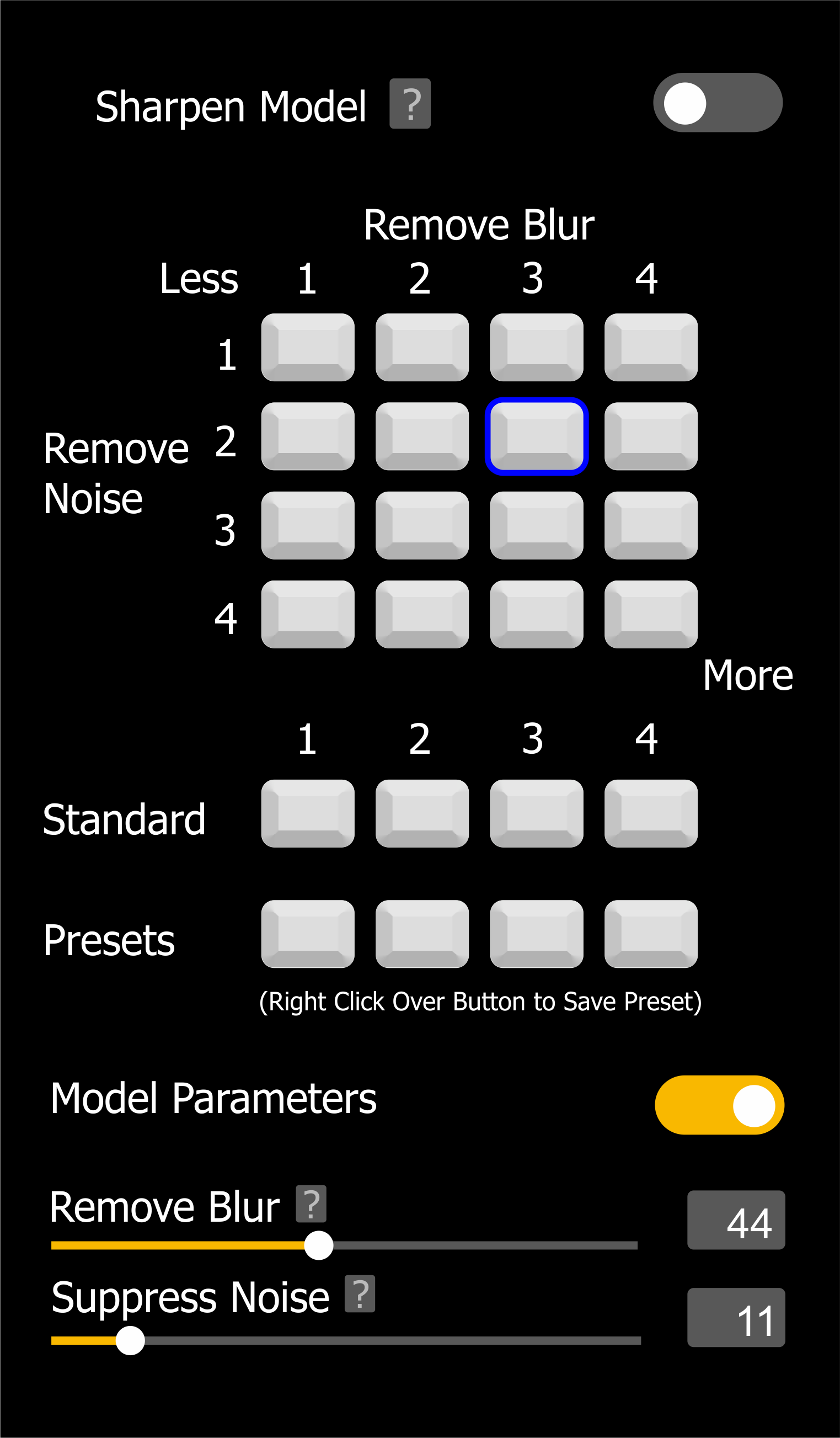
I would prefer to have more levels of presets for various blur and noise settings, maybe a custom saved preset. (See example image)
1 Like
Hello, as long as there is no possibility to use save and use Presets for a series of similar pictures (f. e. with same background editing needs) and to be able to sort in own customable preset folders Photo AI is nice, but much too time consuming. I do not understand that such an obvious essentail feature is not integrated so far. I wrote this in an email but did not get any answer on this.
1 Like
I agree. I would also like to be able to save my own presets in DeNoiseAI, SharpenAI and GigapixelAI as well.
1 Like
exactly! very demanded!
Yes. Topaz Photo V2 suddenly seemed amateur when I discovered I couldn’t save my laboriously entered settings.
I suppose I could have a notebook by my computer and record each adjustment, but I really won’t…
Very helpful graphic!
This is something we’ve been discussing for a while. At the moment you can change the default settings that Autopilot runs in the Preferences menu.
we desperately need save setting preset option !!!
Thanks for your insight. This is something we may look into building for the future. In the meantime, in case you haven’t found this setting already, you can edit one image in the batch and then go to the Edit menu > Apply Current Settings to All. This will transfer all the settings from that one image to the rest of the images in your batch. Unfortunately, this will not carry over to other batches which I understand presets will take care of.
Tim thank you for the message ,
I really hope you can ASAP built it in the same way as camera raw for example has presets , custom presets and last edit settings always remembered.
This is essential functionality and it doesn’t look complicated to add and there are many possible ways how it could be done.
Kind regards
Mladen
This would be great escpecially for cli use. I have not figured out another way than actually opening the app, changing autopilot on/off every time i change between cli batch processes and manual work in the app
Pls create a copy settings button … it’s really anoying to note the settings on a piece of apper to apply them to the next picture …
Generally speakling Photo AI is a wonderful product that uses a massively over-exaggerated choice of settings on an image to leave them looking like a WaxWork. You then spend 20 minutes carefully getting the right balance of settings moving the sliders manually so they look like humans again - then you can’t save Settings as a preset to apply to other images. What madness is this?
I 100% agree with culicmladen. I recently purchased Photo AI, and I have only been using it for a few weeks. When I initially tested the software in the demo mode, in conjunction with Lightroom, I didn’t expect to be able to save presets. But when I purchased the software, I immediately started to look for a way to save settings using a preset or profile option, and I was actually surprised that it doesn’t exist. If I’ve taken a large series of photos at an event with a specific camera, ISO, lens, and lighting, I am able to fine tune the noise, sharpen, etc, settings much better than the auto mode, to get the specific effect I’m going for (instead of some generic effect). Since all the pictures were taken under the same conditions, it would be much more efficient if I could apply a preset, and then tweak the individual pictures from that preset if needed. Processing one or two pictures is not a big deal, but if I have hundreds of photos, I find I need to be much more selective in choosing which photos I end up sending over to Topaz Photo AI for processing. It’s just not practical to use Topaz Photo AI in a large volume workflow without having the ability to have user settable presets.
Me Too!
I find it annoying that I have to re-select settings that I want to use every time I open a photo.
My year of free updates has expired.
I will buy into an upgrade when this, seemingly simple, modification is made.
Yes, I would definitely use this a lot as well.
I’m loving Photo AI 2.3.0 but have been having trouble recreating settings for a particular picture and I would like to have the same setup for saving settings as we have in Video AI. I’ve wasted hours for one picture that was very tricky. I got there eventually and I’ve written all the *+!< settings down… but it’s 2024 people! BTW… Gigapixel 7 is great too, but Photo AI is better imho - just sayin’.
Thanks! Don’t forget to vote for your idea
Just a suggestion… Your “…Don’t forget to vote…” message is at the bottom of the post and is followed by a line of actions “Reply … ” which I think would be a more logical place to have the “Vote” button! IMHO of course.
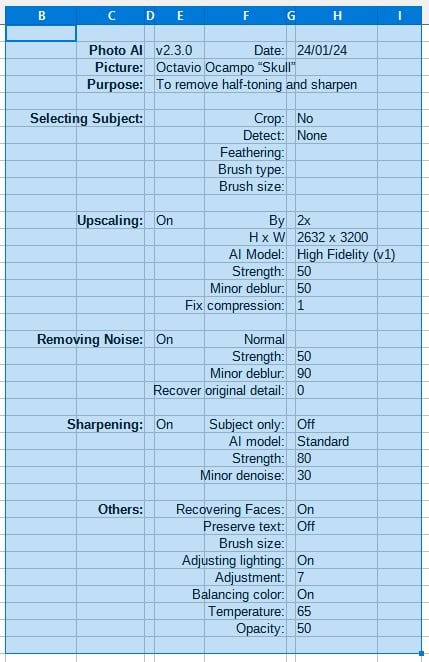
Here’s a jpeg copy of the spreadsheet I made with all the settings I used for a sample half-toned picture I downloaded. The results I achieved with v2.3.0 are excellent, but took a lot of experimenting. I won’t post the picture, but you can find it from comments in the spreadsheet if you want to have a go. It takes a lot of time to get the settings in, even when you have them in writing and then you can’t save them! Not really good enough.