Performance Benchmarking

Topaz Video AI Beta v3.1.9.0.b
System Information
OS: Windows v11.2009
CPU: AMD Ryzen 7 5800X 8-Core Processor 63.921 GB
GPU: NVIDIA GeForce RTX 2070 SUPER 7.8154 GB
Settings: device: -2 vram: 1 instances: 1
Benchmark Results
Artemis 1X: 10.55 fps 2X: 6.28 fps 4X: 1.62 fps
Proteus 1X: 9.23 fps 2X: 5.21 fps 4X: 1.63 fps
Gaia 1X: 3.55 fps 2X: 2.36 fps 4X: 1.49 fps
4X Slowmo Apollo: 8.04 fps Chronos: 3 fps Chronos Fast: 12.52 fps

Topaz Video AI Alpha v3.2.0.1.a
System Information
OS: Windows v11.2009
CPU: AMD Ryzen 7 5800X 8-Core Processor 63.921 GB
GPU: NVIDIA GeForce RTX 2070 SUPER 7.8154 GB
Settings: device: -2 vram: 1 instances: 0
Benchmark Results
Artemis 1X: 9.72 fps 2X: 6.26 fps 4X: 1.93 fps
Proteus 1X: 8.91 fps 2X: 5.8 fps 4X: 1.89 fps
Gaia 1X: 3.6 fps 2X: 2.36 fps 4X: 1.54 fps
4X Slowmo Apollo: 8.9 fps Chronos: 3.2 fps Chronos Fast: 13.09 fps

2 Likes

Topaz Video AI Beta v3.1.9.0.b
System Information
OS: Windows v10.2009
CPU: AMD Ryzen 9 5950X 16-Core Processor 63.909 GB
GPU: NVIDIA GeForce RTX 3090 23.77 GB
Settings: device: 0 vram: 1 instances: 1
Benchmark Results
Artemis 1X: 16.59 fps 2X: 7.37 fps 4X: 1.95 fps
Proteus 1X: 13.38 fps 2X: 6.4 fps 4X: 1.95 fps
Gaia 1X: 6.8 fps 2X: 4.43 fps 4X: 2.42 fps
4X Slowmo Apollo: 17.56 fps Chronos: 14.32 fps Chronos Fast: 16.18 fps

your problem will be solved in few days, not mine lol. :sob: :skull_and_crossbones:

1 Like

That’s encouraging to see a 7950X on 65W can beat a 13900k (and the 4090 on 250w as well). I was concerned that to unlock the full potential of this, the system would suck back 600-800w under load.

1 Like

Using Ashampoo uninstaller and deinstall everything from TL, it did finally download the models by itself.

Screenshot 2023-03-11 121126


@suraj could you add mhz and type (DDR4/5) of RAM too, and Resolution of Benchmark Video (people want to know).

3 Likes

Topaz Video AI Alpha v3.2.0.1.a
System Information
OS: Windows v10.2009
CPU: AMD Ryzen 9 5950X 16-Core Processor 31.915 GB
GPU: AMD Radeon RX 6900 XT 15.954 GB
Settings: device: 0 vram: 1 instances: 0
Benchmark Results
Artemis 1X: 10.54 fps 2X: 5.95 fps 4X: 2.04 fps
Proteus 1X: 9.41 fps 2X: 5.88 fps 4X: 2.01 fps
Gaia 1X: 5.33 fps 2X: 3.55 fps 4X: 2.23 fps
4X Slowmo Apollo: 13.73 fps Chronos: 5.86 fps Chronos Fast: 10.6 fps

This version puts a 6900XT slightly ahead of a 3090 on the curernt beta!

1 Like

Topaz Video AI Alpha v3.2.0.1.a
System Information
OS: Windows v10.2009
CPU: AMD Ryzen 9 5950X 16-Core Processor 63.909 GB
GPU: NVIDIA GeForce RTX 3090 23.77 GB
Settings: device: 0 vram: 1 instances: 0
Benchmark Results
Artemis 1X: 16.74 fps 2X: 9.07 fps 4X: 2.83 fps
Proteus 1X: 14.96 fps 2X: 8.21 fps 4X: 2.71 fps
Gaia 1X: 6.16 fps 2X: 4.1 fps 4X: 2.53 fps
4X Slowmo Apollo: 17.92 fps Chronos: 14.74 fps Chronos Fast: 23.81 fps

40% performance uplift with the Alpha compared to the latest beta! Very nice

1 Like

This is my 2nd benchmark, while running an other video

Topaz Video AI Alpha v3.2.0.1.a
System Information
OS: Windows v11.2009
CPU: AMD Ryzen 7 5800X 8-Core Processor 31.916 GB
GPU: NVIDIA GeForce RTX 3060 11.845 GB
Settings: device: 0 vram: 1 instances: 0
Benchmark Results
Artemis 1X: 3.98 fps 2X: 2.98 fps 4X: 0.95 fps
Proteus 1X: 3.97 fps 2X: 2.98 fps 4X: 0.95 fps
Gaia 1X: 1.31 fps 2X: 0.89 fps 4X: 0.61 fps
4X Slowmo Apollo: 4.83 fps Chronos: 2.83 fps Chronos Fast: 4.76 fps

In fact, you can compare very well.

Now it would be interesting with a weaker GPU and a fast CPU, maybe someone else will show up.

Topaz Video AI Beta v3.1.9.0.b
System Information
OS: Mac v13.0201
CPU: Apple M1 Ultra 64 GB
GPU: Apple M1 Ultra 48 GB
Settings: device: -2 vram: 0.8 instances: 1
Benchmark Results
Artemis 1X: 10.59 fps 2X: 6.64 fps 4X: 2.24 fps
Proteus 1X: 10.82 fps 2X: 5.99 fps 4X: 2.2 fps
Gaia 1X: 4.17 fps 2X: 2.92 fps 4X: 2.53 fps
4X Slowmo Apollo: 7.47 fps Chronos: 3.87 fps Chronos Fast: 4.32 fps

Topaz Video AI Alpha  v3.2.0.1.a
System Information
OS: Windows v10.2009
CPU: AMD Ryzen 7 5800X3D 8-Core Processor             31.912 GB
GPU: NVIDIA RTX A4000  14.817 GB
Settings: device: 0 vram: 1 instances: 0
Benchmark Results
Artemis		1X: 10.8 fps 	2X: 6.45 fps 	4X: 1.7 fps 	
Proteus		1X: 9.93 fps 	2X: 5.98 fps 	4X: 1.69 fps 	
Gaia		1X: 3.93 fps 	2X: 2.7 fps 	4X: 1.59 fps 	
4X Slowmo		Apollo: 9.05 fps 	Chronos: 9.07 fps 	Chronos Fast: 14.03 fps
1 Like

Topaz Video AI Alpha v3.2.0.1.a
System Information
OS: Windows v10.2009
CPU: AMD Ryzen 5 2600X Six-Core Processor 31.927 GB
GPU: NVIDIA GeForce RTX 3080 Ti 11.816 GB
Settings: device: 0 vram: 1 instances: 0
Benchmark Results
Artemis 1X: 13.34 fps 2X: 6.65 fps 4X: 1.94 fps
Proteus 1X: 11.23 fps 2X: 5.94 fps 4X: 1.88 fps
Gaia 1X: 6.26 fps 2X: 4.34 fps 4X: 2.22 fps
4X Slowmo Apollo: 13.03 fps Chronos: 14.63 fps Chronos Fast: 18.36 fps

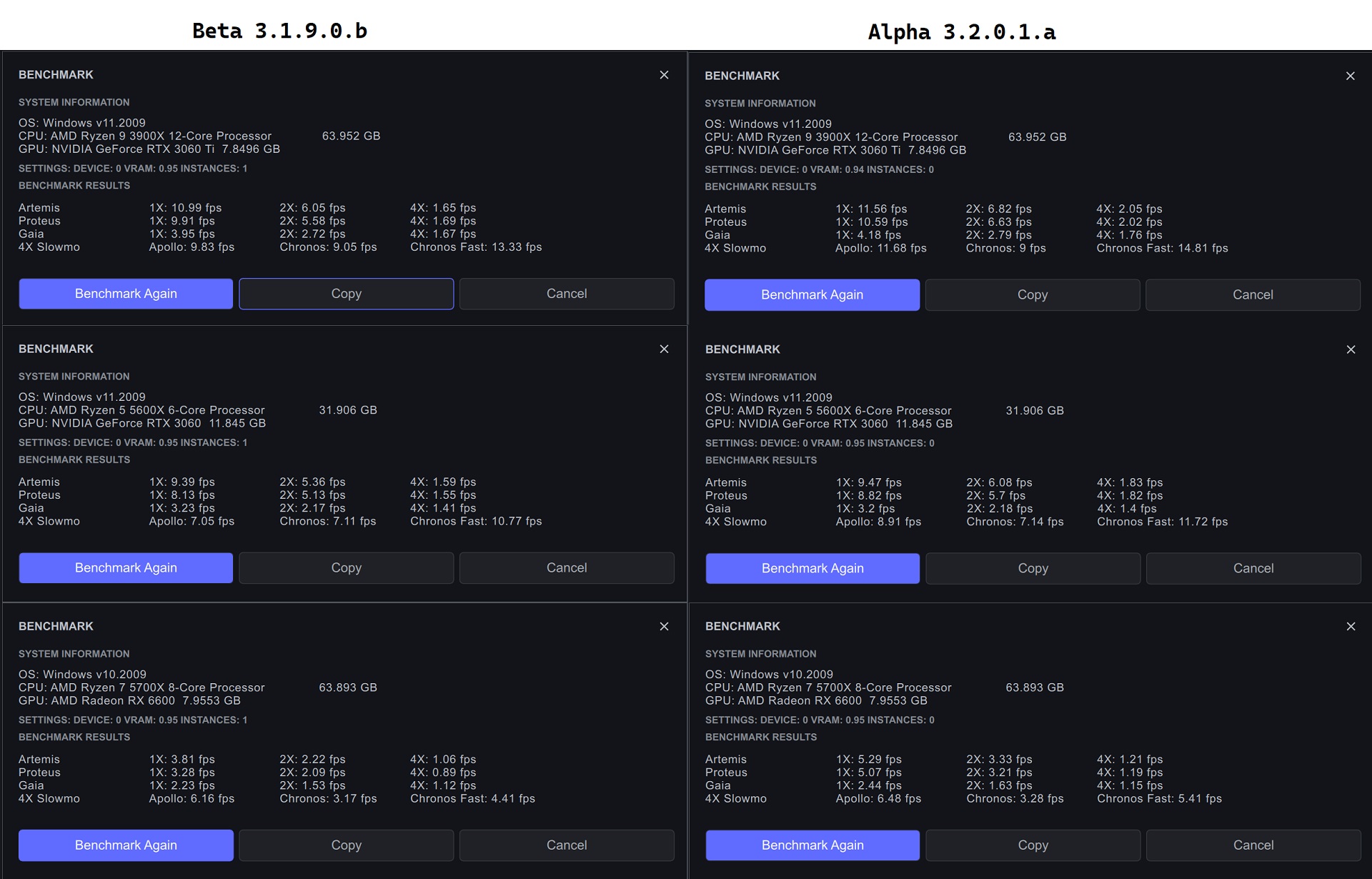
Solo benchmark test

2 Likes

@tony11
comparing your benchmark results with those on my Ryzen 5800 8-Core processor @ 4.2GHz with an NVIDIA RTX 3060 @1.867GHz.
Your results are significantly better than my benchmarks,
it demonstrates that a stronger GPU is more important for TVAI than CPU.

2 Likes

I just ran the benchmark again with HWMonitor open, and even the 13900K cycles between only 40W-80W while running the benchmark. This benchmark doesn’t do any encoding, although if you use the GPU hardware encoder it won’t add a ton of extra wattage.

I should have also mentioned that I similarly power limit my 4090, because the 450W default is dumb. I just tried benchmark runs at 100% power target for the 4090, and the performance results didn’t increase at all.

2 Likes

For fun I thought I’d test running the old Mac Pro using the all GPUs setting. Unlike in the older 2.x software this did look like using both GPUs about doubled performance. I have some eGPU enclosures I’ll test out when I’m in that location and a couple of AMD 6800/6900xt. Will be interesting to see how that does compared to the new Macs.

Topaz Video AI Alpha v3.2.0.1.a
System Information
OS: Mac v12.0603
CPU: Intel(R) Xeon(R) CPU E5-2697 v2 @ 2.70GHz 64 GB
GPU: AMD Radeon HD - FirePro D300 2 GB
Settings: device: 2 vram: 1 instances: 1
Benchmark Results
Artemis 1X: 0.7 fps 2X: 0.48 fps 4X: 0.2 fps
Proteus 1X: 0.69 fps 2X: 0.45 fps 4X: 0.17 fps
Gaia 1X: 0.17 fps 2X: 0.12 fps 4X: 0.1 fps
4X Slowmo Apollo: 0.64 fps Chronos: 0.15 fps Chronos Fast: 0.35 fps

So, it can as much as possible come to such extreme values as you turn on 3-4 files at once. ;D

Here are my results on Mac Studio:

Topaz Video AI Beta v3.1.9.0.b
System Information
OS: Mac v13.03
CPU: Apple M1 Max 32 GB
GPU: Apple M1 Max 21.333 GB
Settings: device: 0 vram: 1 instances: 1
Benchmark Results
Artemis 1X: 7.35 fps 2X: 4.83 fps 4X: 1.93 fps
Proteus 1X: 7.12 fps 2X: 4.87 fps 4X: 1.61 fps
Gaia 1X: 2.46 fps 2X: 1.61 fps 4X: 1.34 fps
4X Slowmo Apollo: 4.53 fps Chronos: 2.3 fps Chronos Fast: 3.93 fps

What driver are you using? I’ve tried running it on a similar machine a few times and the driver keeps hanging. I just updated it to the latest after the previous drive was hanging and same issue.

updated to performance alpha release on Mac Studio

Topaz Video AI Alpha v3.2.0.1.a
System Information
OS: Mac v13.03
CPU: Apple M1 Max 32 GB
GPU: Apple M1 Max 21.333 GB
Settings: device: 0 vram: 1 instances: 1
Benchmark Results
Artemis 1X: 7.67 fps 2X: 4.97 fps 4X: 2.02 fps
Proteus 1X: 7.33 fps 2X: 4.64 fps 4X: 1.78 fps
Gaia 1X: 2.36 fps 2X: 1.65 fps 4X: 1.38 fps
4X Slowmo Apollo: 4.52 fps Chronos: 2.29 fps Chronos Fast: 4.03 fps