I’m experiencing a serious thermal issue with the latest Topaz Video on my Mac Studio M3 Ultra. After approximately 10 minutes of Proteus batch processing, the computer becomes extremely hot and repeatedly enters emergency sleep.
I’ve now reproduced the problem several times and captured temperature, fan-speed, and macOS power-management logs confirming the behavior.
System configuration
-
Computer: Apple Mac Studio M3 Ultra (2025)
-
macOS: Version 26, build 25G83
-
Software: Latest Topaz Video
-
Enhancement model: Proteus
-
Input resolution: 4K
-
Output resolution: 6K
-
Processing: Batch rendering
-
Topaz Low Power Mode: Enabled
The problem
During batch rendering, Topaz initially processes normally. After approximately 10 minutes, internal temperatures rise dramatically.
Eventually, the entire Mac Studio enters sleep. The external hard drives spin down, the fans stop, and the computer becomes unresponsive.
After waking the Mac using the mouse or keyboard, it sometimes goes back to sleep almost immediately, creating a repeating sleep/wake cycle.
This happens even when I’m actively using the computer, including moving the mouse and watching YouTube while Topaz processes.
The Mac works normally with Topaz closed.
Initially, I suspected a macOS power-management issue. However, Terminal logs confirmed that macOS is initiating thermal emergency protection:
Entering Sleep state due to ‘Thermal Emergency Sleep’
This is not normal idle sleep.
Temperature monitoring with TG Pro
I installed TG Pro and recorded the behavior, including temperature and fan-speed logging every approximately two seconds.
Normal operation — Topaz closed
| Component | Reading |
|---|---|
| CPU cores | 48–51°C |
| GPU clusters | 51–52°C |
| Front airflow | 40–42°C |
| Rear airflow | 44–50°C |
| Left fan | 1,012 RPM |
| Right fan | 1,008 RPM |
At idle/light usage, the machine is stable and relatively quiet. macOS also reports Nominal thermal pressure.
During Topaz processing
The latest captured render produced the following peak readings:
| Component | Recorded peak |
|---|---|
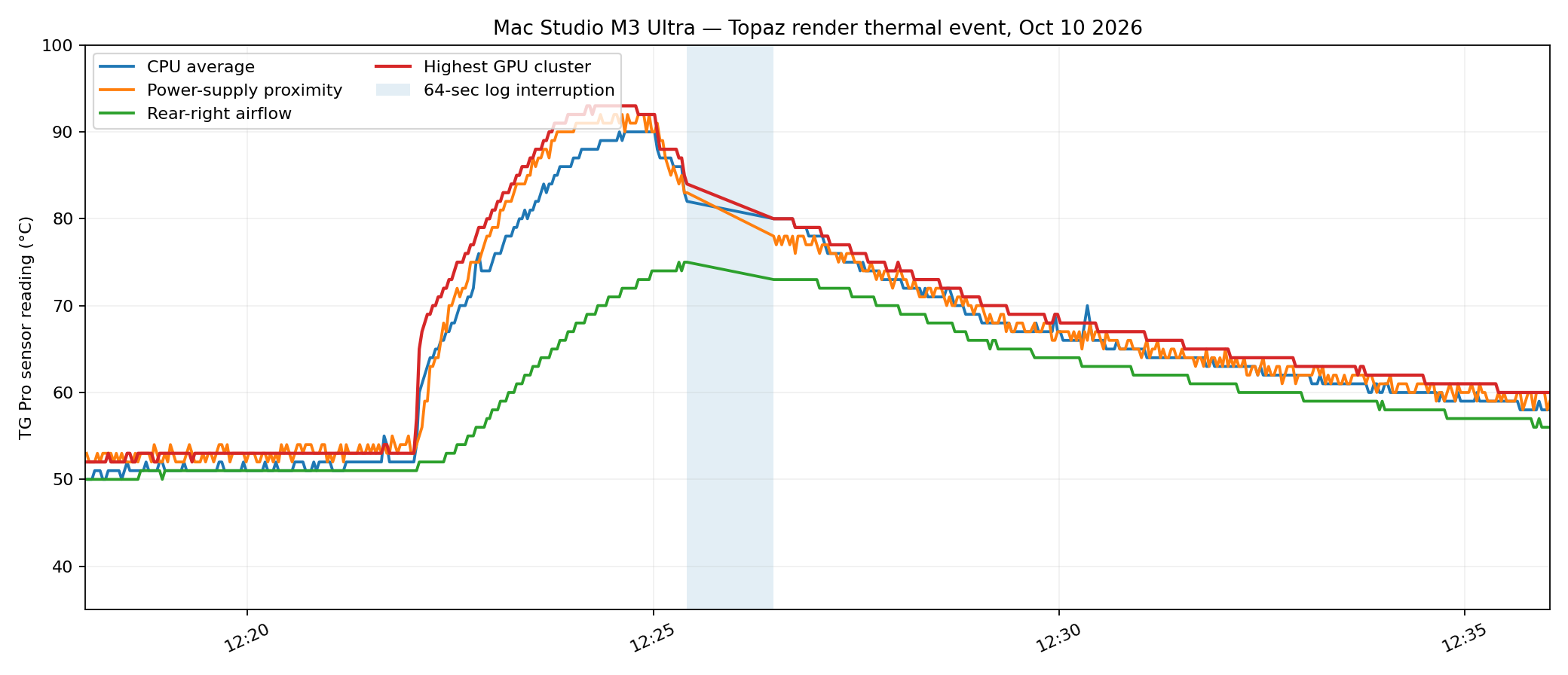
| CPU core | 93°C |
| GPU cluster | 93°C |
| CPU average | Approximately 90°C |
| Power supply proximity | 92°C |
| Rear exhaust airflow | 75°C |
| Front airflow | 58°C |
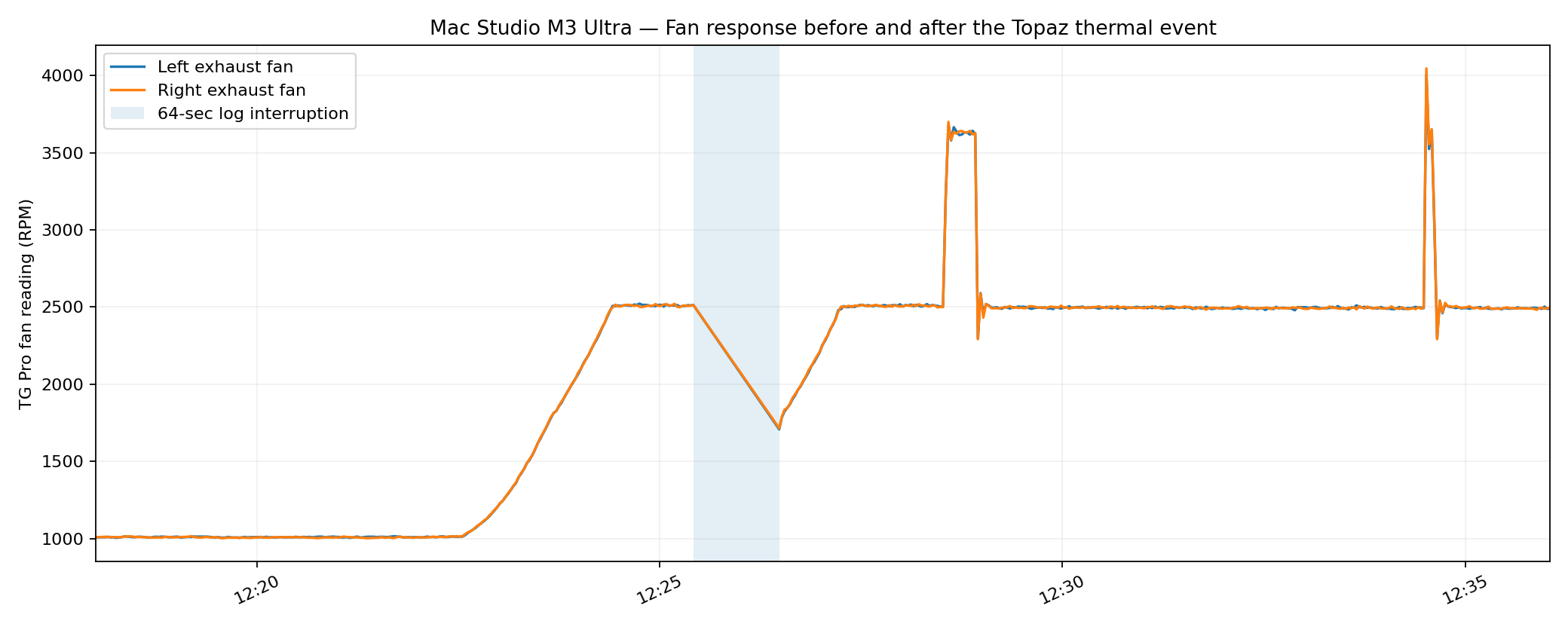
| Fan speeds | Over 4,000 RPM recorded at peak |
The power supply’s own temperature sensor peaked at approximately 50°C; the 92°C figure is from the separate proximity sensor.
The temperature graphs show CPU/GPU readings climbing from approximately 50°C to more than 90°C within a few minutes.
Both cooling fans appear to operate, and TG Pro reports no obvious sensor or fan failure.
Confirmed thermal emergency — October 10
The latest incident was captured in both TG Pro and macOS logs.
Timeline:
-
Approximately 12:22 — Temperatures begin rising during Topaz processing.
-
Approximately 12:24 — CPU/GPU temperatures reach approximately 93°C.
-
12:25:25 — Last TG Pro measurement before logging interruption.
-
12:25:51 — macOS initiates Thermal Emergency Sleep.
-
12:26:29 — TG Pro logging resumes.
The exact macOS log entry:
2026-10-10 12:25:51 +0200 — Entering Sleep state due to ‘Thermal Emergency Sleep’ — 33 secs
TG Pro recorded a 64-second gap that closely matches the thermal sleep event.
I have attached screenshots and graphs showing the temperature increase and fan response.
Additional troubleshooting
I initially had a second Mac Studio M4 (powered off) stacked on top of the M3 Ultra.
Thinking that airflow or heat dissipation might be contributing to the problem, I removed the M4 completely.
I reproduced the thermal emergency again with the M4 removed.
The machine operates normally when Topaz is closed. Temperatures decrease, and fan speeds return to approximately 1,000 RPM.
Topaz’s Low Power Mode was already enabled during the problematic renders.
I understand that 4K-to-6K Proteus processing is demanding, but I would expect a Mac Studio M3 Ultra to manage sustained GPU workloads without repeatedly entering thermal emergency sleep.
I’m not ruling out an Apple hardware or thermal-management fault, but so far the problem has only occurred during Topaz processing.
Questions for the Topaz development team
-
Has Topaz received similar reports from Mac Studio M3 Ultra users, particularly during high-resolution Proteus batch rendering?
-
Is Topaz’s Low Power Mode working correctly on M3 Ultra systems? I’ve seen reports that it may not properly reduce GPU load in recent versions.
-
Could a GPU memory-management issue, processing bug, or resource accumulation between batch jobs cause excessive thermal load?
-
Is there a supported way to limit GPU utilization or power consumption during Topaz rendering? I would happily sacrifice some processing speed for lower temperatures and stability.
-
Are there known compatibility issues between recent Topaz Video versions, Proteus, and macOS 26 on M3 Ultra?
-
Which diagnostic logs would be most useful to your developers?
I realize that the thermal emergency is being initiated by macOS, and that further Apple hardware diagnostics may be necessary. However, the fact that it consistently occurs during Topaz processing makes me want to investigate potential software-related causes as well.
Has anyone else experienced this behavior with an M3 Ultra? Has anyone found a workaround?
I can provide the complete TG Pro CSV log, temperature/fan graphs, and macOS sleep logs.
Thanks!