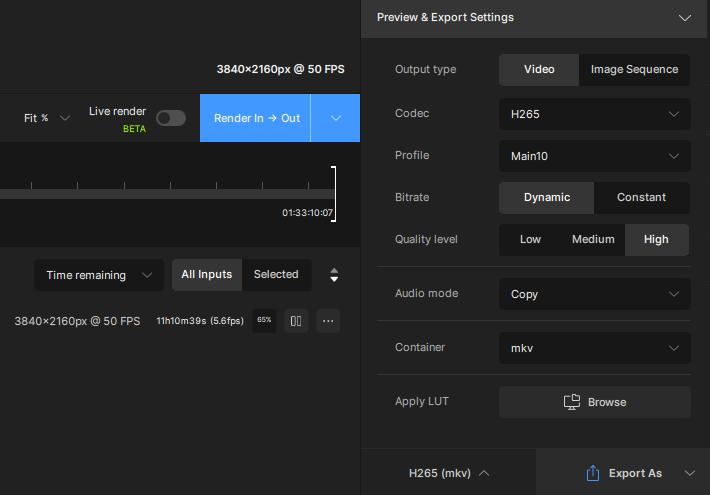
Which codec is being used for these exports? It’s possible that we can adjust how frequently the app is writing sections of the video to disk, which could reduce the % of progress lost when resuming.
We currently need to have some overlap when resuming an export to ensure that auto-parameter settings are consistent across the entire video export.
I use h.265 high profile, but will soon AV1, so if both can be patched …
My LAN is 10 GB/s, up to 20 GB/s depending on server. Drives are Nvme or RAID HDD ( >700MB/s)
Dedicated “Workspace drive”, its activity is marginal, almost sleeping
No worries outside of TVAI
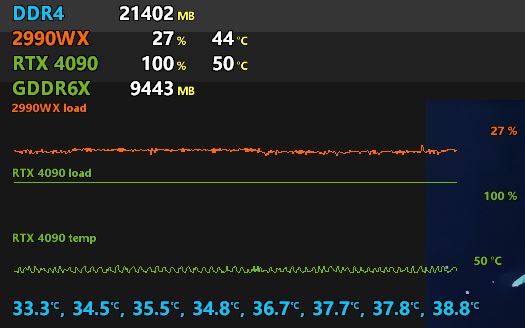
One server that hosts Nvme 2 To “Workspace” is also encoding :
Absolute no bandwidth used (green + orange text)
Server load :
Looks very fair and should not disturb anything
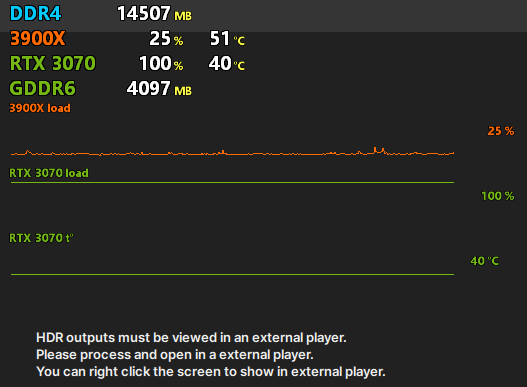
Client load :
The one who suffers the higher of this problem
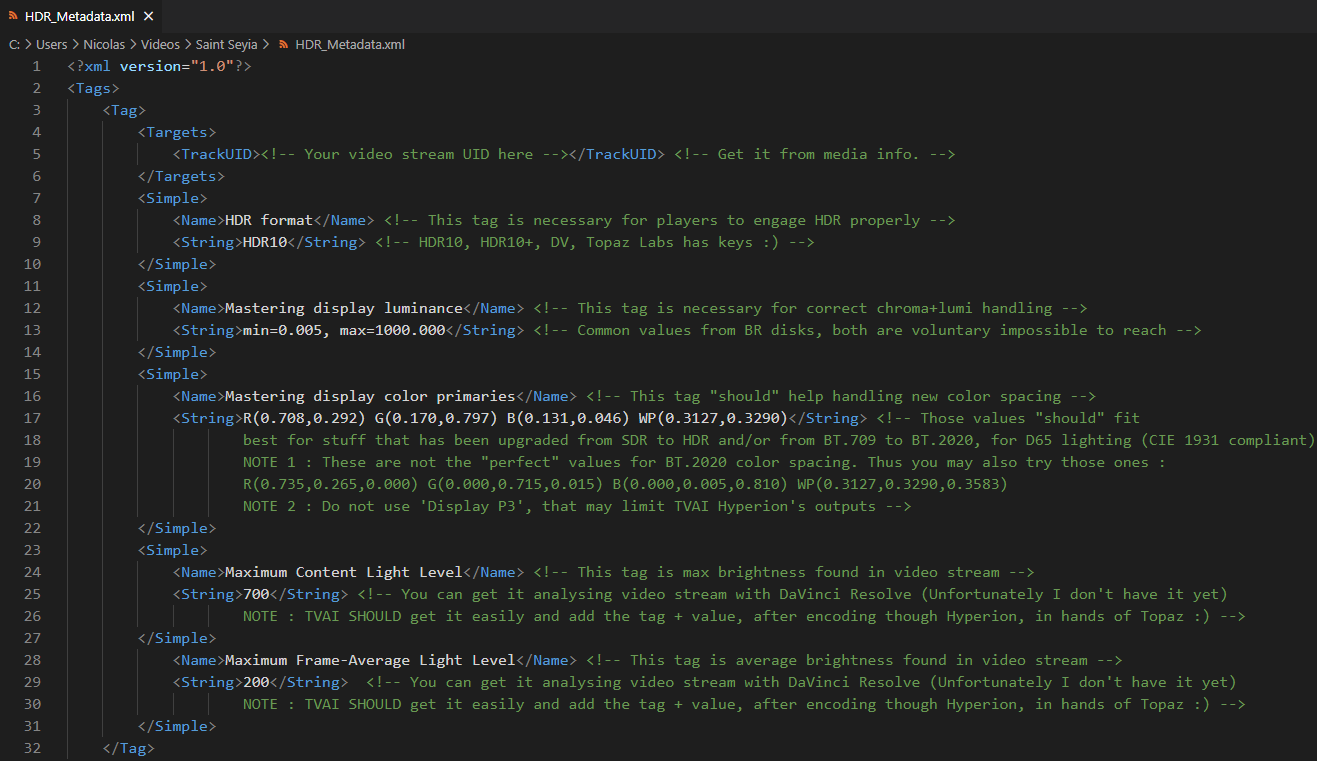
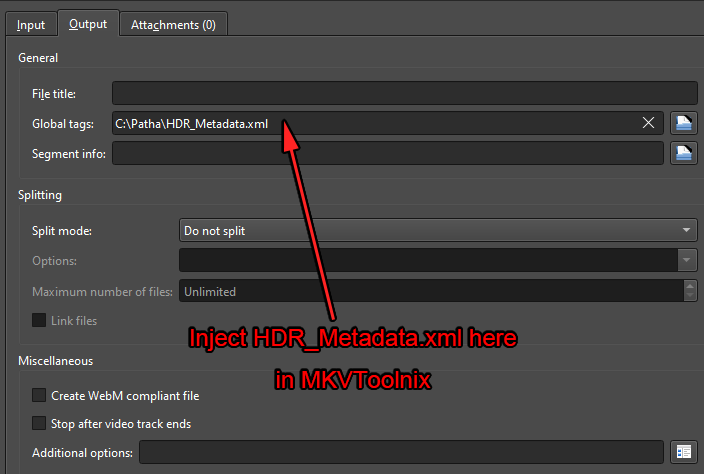
Here some extended informations on how to add metadatas to Hyperion’s outputs files in order to get it well handled by players.
Many usefull metadatas are currently lacking in Hyperion’s job and you may get very good result by only adding correct metadatas to output file.
NOTE : I am not expert on it, ready to hear contradictions to make the job go ahead
On my side it fully solved HDR playing whatever the player I use
HTPC (librelec + Kodi 21) : solved
Vero 4K+ (OSMC + Kodi 19): solved
Windows (MPC SE + MadVR) : solved
It looks like Topaz is rushing the HDR model, and we can understand it as it’s alpha
Got awesome results using this parameters even on projector with poor nits (80 + 1.0 gain screen)
<?xml version="1.0"?>
<Tags>
    <Tag>
        <Targets>
            <TrackUID><!-- Your video stream UID here --></TrackUID> <!-- Get it from media info. -->
        </Targets>
        <Simple>
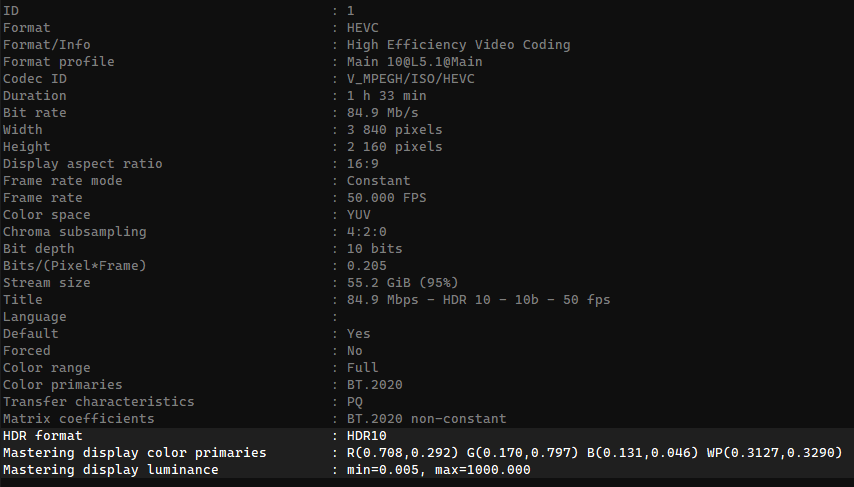
            <Name>HDR format</Name> <!-- This tag is necessary for players to engage HDR properly -->
            <String>HDR10</String> <!-- HDR10, HDR10+, DV, Topaz Labs has keys :) -->
        </Simple>
        <Simple>
            <Name>Mastering display luminance</Name> <!-- This tag is necessary for correct chroma+lumi handling -->
            <String>min=0.005, max=1000.000</String> <!-- Common values from BR disks, both are voluntary impossible to reach -->
        </Simple>
        <Simple>
            <Name>Mastering display color primaries</Name> <!-- This tag "should" help handling new color spacing -->
            <String>R(0.708,0.292) G(0.170,0.797) B(0.131,0.046) WP(0.3127,0.3290)</String> <!-- Those values "should" fit
                    best for stuff that has been upgraded from SDR to HDR and/or from BT.709 to BT.2020, for D65 lighting (CIE 1931 compliant)
                    NOTE 1 : These are not the "perfect" values for BT.2020 color spacing. Thus you may also try those ones :
                    R(0.735,0.265,0.000) G(0.000,0.715,0.015) B(0.000,0.005,0.810) WP(0.3127,0.3290,0.3583)
                    NOTE 2 : Do not use 'Display P3', that may limit TVAI Hyperion's outputs -->
        </Simple>
        <Simple>
            <Name>Maximum Content Light Level</Name> <!-- This tag is max brightness found in video stream -->
            <String>700</String> <!-- You can get it analysing video stream with DaVinci Resolve (Unfortunately I don't have it yet)
                    NOTE : TVAI SHOULD get it easily and add the tag + value, after encoding though Hyperion, in hands of Topaz :) -->
        </Simple>
            <Name>Maximum Frame-Average Light Level</Name> <!-- This tag is average brightness found in video stream -->
            <String>200</String>  <!-- You can get it analysing video stream with DaVinci Resolve (Unfortunately I don't have it yet)
                    NOTE : TVAI SHOULD get it easily and add the tag + value, after encoding though Hyperion, in hands of Topaz :) -->
        </Simple>
    </Tag>
</Tags>
Firstly, thank you for listening to our feedback! It’s clear from Alpha#2 that you took our input seriously. This version is a significant improvement over Alpha#1.
After a week of converting various videos from SDR to HDR using the new model, I must admit that I can hardly find any major issues. The previously noticeable color shifts can now be excellently controlled with the new slider. However, I feel that a value of 0 and similarly low values are not very useful. Depending on the material, I had good experiences with values between 75 and 95. But even with a value of 75, achieving a good result is rare, and it seems to heavily depend on the quality of the SDR video. The exact factor responsible for this remains unclear to me.
The brightness distribution in the image is now much more homogeneous and natural. The entire image is no longer brightened uniformly, and highlights are genuinely enhanced. My tests with my Avatar test video were significantly better in Alpha#2 than in Alpha#1 for the reasons mentioned above.
I haven’t noticed any loss of details near black, at least not on my uncalibrated LG55CX9 in cinema mode.
Currently, the biggest issue is the lack of a player within the program. I hope this will be added soon. I’m also missing precise definitions for the “Adjust exposure” values. I need a clear indication of the maximum and minimum values. Additionally, the “Expand highlights” setting seems to need further fine-tuning, as values below 50 are barely usable based on my experience.
With “Adjust exposure,” you can only adjust the average brightness of each individual frame, without any indication of the maximum or minimum brightness. I find it would be useful to determine these values yourself or at least have the option to display them.
Regarding my feedback on the “Expand highlights” setting, I mean that low values significantly alter the image, and a finer adjustment would be beneficial. At least for videos using the rec709 color space. Unfortunately, I don’t have videos with other color spaces, so values below 50 might work well there. But as I said, it’s not entirely clear to me what data this function is based on.
Welle this is exactly what I said in my post. Moreover Max brightness and average brightness are NECESSARY for a HDR10 encoding respecting CEI specs., you can not set it randomly.
Hyperion outputs YUV 4:2:0 if you set it to Main10.
All my Hyperion outputs are BT.2020 4:2:0, 10 b color. How do you get BT.709 ?
And Youtube Means File In HDR will Show up as HDR
In Youtube when uploaded. As for the Max and average brightness Divinchi Resolve Studio Handles that when HDR10+ is enabled.
People switch from Premier to Resolve because of ease of use.Cut page Color Page Export Page no subscription for Studio.
Studio Can be licensed
For Dolby Vision For Audio Handles Atmos and More.
People In fact don’t switch from PP to Resolve because of ease of use. Not sure where you get that info. PP is no more or no less complicated than DR. They’re both easy to use if you know how to use them. If someone is a pro editor then more than likely they use both as I do, along with FCP X and Avid (although it’s been a while on Avid) It’s kind of silly talking about switching from one app or the other because they are tools. Nothing more. Why throw out a tool when you may be called upon to use it? Makes no sense. As far as subscriptions go if one is a working pro then that gets billed out. If someone works solely on their own projects that they will finish themselves then they may be inclined to one tool more than the other but in the long run it’s not an either or proposition when it comes to PP or DR or any other NLE.
Adobe is the Standard .Though Resolve not studio version is free .Schools and Non-Profit only get all programs for $10. To get All Programs You Have to Pay 70-90 monthly or 659 yearly.Resolve Studio is 300 one time covers all updates and versions .If you get their Editing get board you get free Studio Version. The Dongle for 300 works with Fusion Studio and resolve Studio.Now Resolve Studio Works with Teams.
I was Trained on Adobe PP as well Still have it .And
have The Apple Package that has Final Cut Pro.
Final Cut Pro and Resolve Studio Buth are Pay once for Program. Adobe is Stop paying and program stops working .Topaz is Also Program keeps working un like Adobe.
Great job with this guys. Having a blast using it. Just a bit of a suggestion; would it be possible to implement an optional 3rd slider for SDR > HDR gamma control? Perhaps a saturation slider as well?
The subscription model is no thing. My phone is subscription based. My apartment is subscription based. My utilities is subscription based. My porn is subscription based Colourlab Ai is subscription based. I get so much value for my subscription it’s ridiculous. I bill out what adobe charges in less than an hour. DR makes money off the hardware it sells which underwrites its software. It’s the bait for the hardware. It’s not not subscription based out of Black Magics generosity. The Hardware sells allows it to offer DR for 300 bucks. Adobe makes money on its software. It doesn’t have hardware gear to fund its RD. And to have a fully working Color Station with DR involves a huge investment in BM hardware. Why people get all apoplectic over Adobes subscription based software is beyond me. In the past it took 1000s of dollars to by adobe software. We now have it easy.