Another enhanced photo. No “Redefine” used here just Wonder 3.5, Superfocus v3, and a touch of Sharpen Wildlife.
I also have this one a photo of a hyena. It’s hard to tell for sure whether it’s a male or a female, though. In any case, the enhancements from Wonder 3.5, Superfocus V3, and Sharpen Wildlife were sufficient; there was no need to run a pass with Redefine Subtle.
And finally, a photo with two ostriches. Well, the heads aren’t at quite the same angle as in the original, but unfortunately, I couldn’t do any better. The quality was even worse with the local models even though they did manage to get the orientation of their heads right.
In any case, the people I show only the final version to won’t suspect a thing 
 .
Regarding Pairi Daiza Park, which was mentioned earlier:
I found some old photos (from January 14, 2011) taken during a visit to the Miami Seaquarium (Miami, FL). In addition to many dolphins, I saw a massive orca named Lolita (she was 8 meters long). The caretakers performed acrobatic stunts with her—for instance, the orca would rise up, balancing upright on her tail fluke while a caretaker stood on her head. At one point, Lolita splashed back into the water, soaking several rows of the audience (much to the children’s delight, of course). As a reward, she was given pieces of fish. It was a very interesting experience. There isn’t much to see in the photos, and I know I have a video somewhere—but where? Anyway, here is at least one photo (taken with a Panasonic camera back then).
I wasn’t quite sure how to process these, but I gave it a try: I used Wonder 3.5 (for a 2x upscale), then applied a “Text” enhancement (to pick up text on the spectators’ T-shirts) and a “Faces” enhancement, followed by another pass through Wonder. I think the result is a bit better. You can clearly see the orca’s enormous teeth!
Lolita, The Orca
Not bad. Even the two seagulls in mid-flight are much improved. The only snag is that the text on some of the spectators’ T-shirts doesn’t quite match the lettering in the source photo—though this is only the case for a few T-shirts, not all of them. And the orc and his mistress are well restored.
Per example here:
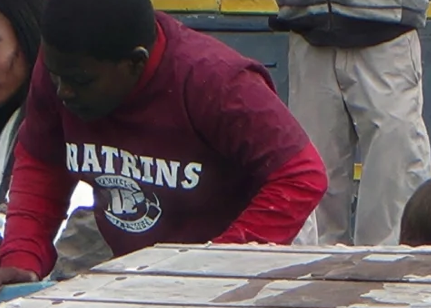
That word doesn’t mean anything.
But at the source, I see “Eatkins” or “Watkins”. I don’t think that really means much, either. But it’s more likely that this is what’s written on his sweatshirt.
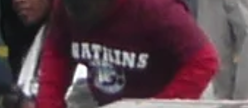
Yes, true. But as for the text, I have no idea—it could be anything, or nothing at all. In the enhanced version, it looks something like “RATRINS” or who knows what… If you plug the text string into a search engine (like Google), you’ll always get some kind of result. It’s impossible to decipher from the photo; the inscriptions are 15 years old and may no longer correspond to the reality of today. I don’t typically focus on text in photos (my hobby deals with animals), so I wouldn’t even know how to approach it—I just gave it a try out of curiosity. Perhaps the AI didn’t recognize it as text, possibly due to the decorative style of the lettering or something similar. In the context of this photo, it’s completely inconsequential (though not ideal  ).
I also wanted to try it with faces. Gigapixel identified 8, while Photo identified 10, with the option to add 3 more. I added those and manually included others that hadn’t been selected. Even then, it rejected several of them. (It didn’t even accept the face of Lolita the orca! 
 )
Some details have to be inferred, and that process can vary from person to person. I’ll gladly leave the deciphering of text to others  . In this case, AI designed for image processing is hardly in a position to meaningfully analyze the potential meanings or contexts behind the inscriptions on the T-shirts
 .
Yeah, I figured. In any case, the interesting part was mainly the orc and his mistress.
Well, yes, that’s to be expected. Facial recovery is only for faces not for animals. That’s how the model was trained.
After some searching, I didn’t really find anything. But the AI thinks the word might be “Mathins.”
I even tried a Google Image search, but it didn’t really find the sweatshirt with that inscription on it.
So, we might never know, lol. But that’s okay. It’s not the interesting part of the photo, since it’s just in the background. You could even add some depth-of-field blur to better focus the viewer’s gaze on the foreground  .
Originally, I wanted a blurred background, but then I decided to try out the Face and Text enhancers I hadn’t used yet—just for fun. The blur doesn’t really fit with that. After a while, I lost interest; the photo isn’t actually that interesting anyway.
Based on the date and place I found.
The text in the image reads “WATKINS” because it is a commemorative or vintage “Watkins the Orca” William Schevill and William Watkins, published groundbreaking audio research on the vocalization and acoustic structures of the park’s captive killer whales. Their 1966 study, “Sound Structure and Directionality in Orcinus (killer whale),” was widely celebrated in marine biology circles.
All right.
