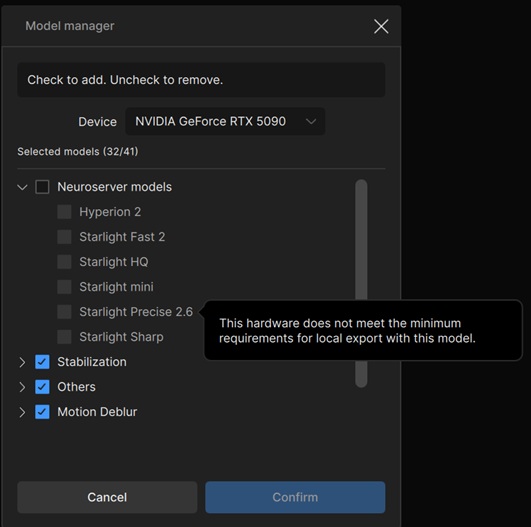
This is my log. Never able to use 2.6 anyway. Hope that I can get help from you! My PC is 5090v2+9800x3d+48GB.
logsForSupport.zip (1.9 MB)
Do you wait less than 6-7 minutes before you give up?
For me (Win11, RTX 5060Ti) I must wait 6-7 minutes before SLP starts working 
Of course it’s bug!
It looks like the model was not updated completely in the logs.
Please do a full uninstall and click to clear old models and files, then a clean install with the following installer.
This should resolve this issue for you. If not, please email the support team directly with the updated logs for further investigation.
Thank you! But then I fail to install neuroserver all the time automatically. Is it possible that I can download it manually?
Did you reboot between the uninstall and reinstall? I had a problem with the neuroserver install once that was caused by some file in the neuroserver subdirectory being open when the install ran. It threw the error: Tree swap failed. When the neuroserver install sees an existing directory, it creates the new install in a directory called “neuroser.New” which is renamed at the end of the install. If a file is open in the old directory, the install will fail.
I always reboot after an uninstall to make sure no file is left open. YMMV.
Good luck!
Neuroserver is included in the version 1.7.0 installer. Download the version 1.7.0 installer from the first post—it worked for me, but for some reason, an “Error” message still pops up from time to time. I guess we’ll just have to wait for version 1.7.1.
Oh my bad, after reading the forums, i had to not only, uninstall topaz completely, But also delete every topaz file off my hard drive, Than reinstall, and now the neuroserver models are installing for me.
what a headache but im looking foward to running starlight again, sorry for jumping into your thread hjjegg123