In both,but only while using the original file out of the cam(fuji xt3)
once i edit/cut the file in Tmpgenc,the problem is gone-strange…maybe because i use eterna inbuild lut while recording.
1 Like
Thanks Marty
Once the GUI is straighten out I’m sure it’s going to be good.
Ahh thanks i was getting the 1% stuck while trying to stabilize a clip
Another Issue i found is that you can’t select a folder for your temp files, when you select the folder in the dialogue and hit ok it doesnt change. Restarting the software doesnt update this either. You have to manually input the folder name but even then, im not sure its working.

Lee thanks so much. That is what I really needed. I finally have a processed file with the settings I normally use. The quality of the output was great.
It will be nice when the program gets all the old features worked out also but to implement the changes that everyone was looking for and make VEAI more efficient I guess a new rewrite was needed. This will take some time I guess for the developers to get 3.0 to it’s first full release. Looking forward also to what new models they come out with in the future.
1 Like
Hi,i`ve uploaded the clips to filehost.
https://www.swisstransfer.com/d/455ad250-a062-4f74-be15-b1a01e864468
The color shift issue only occurs when using the original file out of the cam…once cut/edit before throwing it into video ai,it is gone,so don`t bother.Used these only for testing 10 bit material…usually no need for upscaling these.
Thanks!
1 Like
I keep getting this error " Ffmpeg cmd option Error " on the preview, there is a little info box when i click it it displays this error. This happens on every mode accept the stabilize function, but with the stabilize function its stuck at 1% for a very long time, i cant cancel the operation either, i have to fully close the app to clear it.
I am also seeing something similar (ghosting, strange colour bleed) when using the initial “preset” - “Enhance picture quality of a video clip” (on a Mac)
I was able to get the error to go away by manually changing the model folder. However I still can’t get the stabilize module to work, it get stuck at 1%, i’ve let it run for 10 mins and nothing updates. Any idea how to fix this? I dont see any network, cpu or gpu usage when running the preview either so im wondering if its just broken
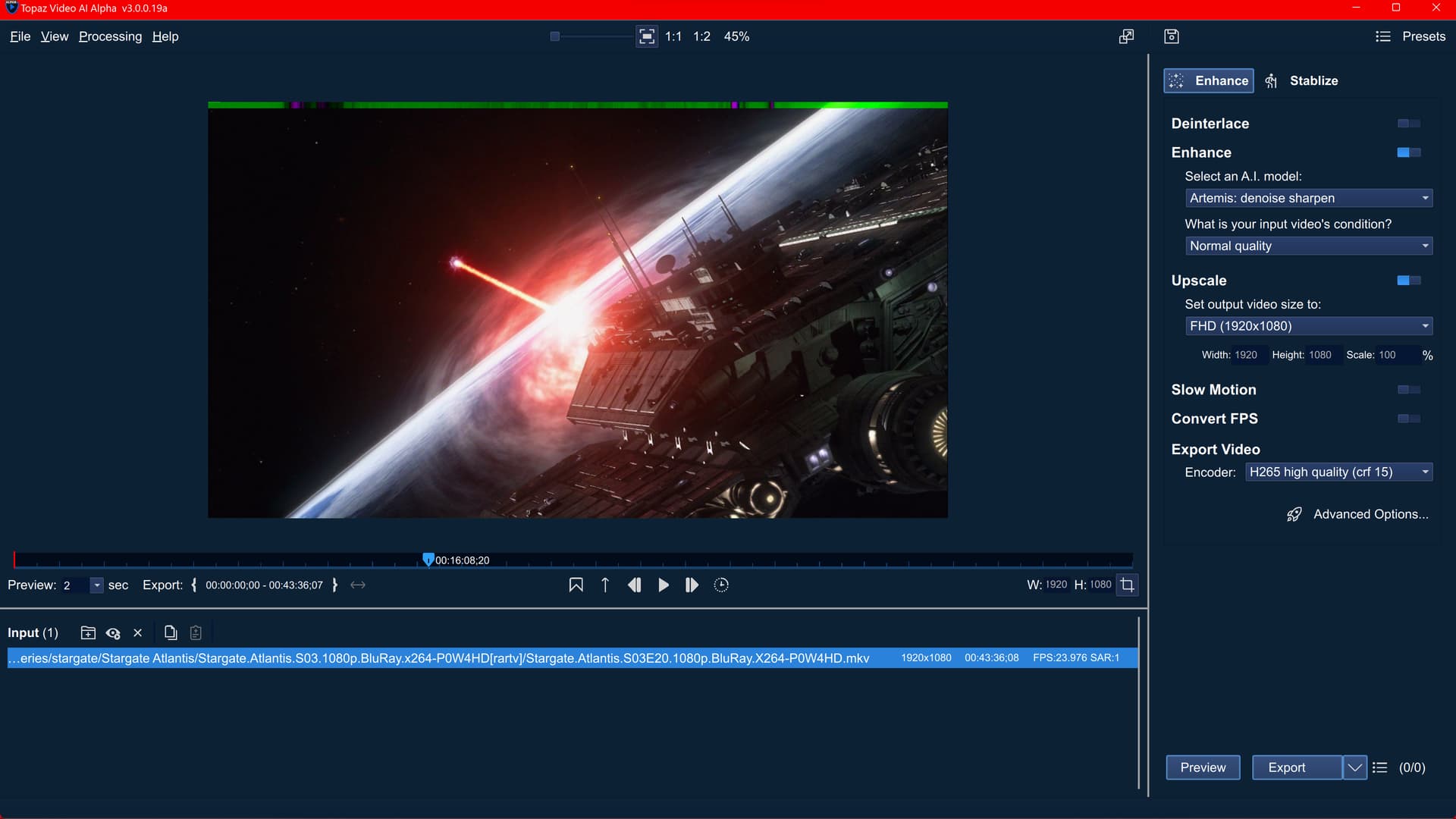
uploading into dropbox as “sga video issue” apparently the alpha cannot handle 5.1 sound as well. attached a .png of the green/violet strip on the top of the video + the logs of the alpha + a copy of the stargate atlantis episode. btw ALL the episodes has the green/violet issue on top. and i ONLY used the GUI did not touched ANY command since whats the point of testing an alpha program if i am messing with basic/internal parameters at random causing random issues? no point whatsoever in my rule book.
this is the .png example of the strip:
1 Like
You are most welcome!
No, the settings for temp folder and model folder…neither work.
Thought I’d share a link to the V2.6.4 thread about an odd slowdown I had today in VEAI. It was hardware related and not a VEAI software issue. It was not what I was expecting.
https://community.topazlabs.com/t/video-enhance-v2-6-4/27636/913?u=mikef
1 Like
Toby - thanks! I received the files. I can reproduce the main preview getting squished. For the bad ghosting issue when using Proteus with Auto settings, it is also reproducible and has been reported by other users. We are working on both issues. Though, I’m not able to reproduce or see the black borders getting missing. I can see the black borders in the processed files you sent me (with Proteus and Artemis) - the same way they show up on the left and right in the exported video from 2.6.4. Can you confirm for me if you are still running missing the borders? If so, can you send me a screenshot of how it looks like to you? The logs should be in ~/Library/Application Support/Topaz Labs LLC/Topaz Video AI Alpha. You can also get them by using Help > Logging > Open Log Folder in the software.
Thanks!
Hi! Please click on the “Close” button on the bottom right of the login dialogue and it should enable you to use the software in trial mode. The Close button currently looks grayed out but it should work and let you get in.
I don’t think you meant to reply to me 
Hi - When you get that “Ffmpeg cmd option Error” error, it show show you a “Show Details” error button. Can you click on it, save it in a text file/doc and send me the file? I’d also ask you to send me your log files from Help> Logging > Open Log Folder after reproducing the error and also send me a screenshot of the window that pops up after clicking the “Advanced Options” button on the bottom right under the settings. You can send the info here or through: Submit File to Dropbox.
Please leave me a note here if you sent me something through Dropbox.
Thank you!
Hi - that’s because that preset uses Proteus with Auto settings. This combination is causing this ghosting and color shift. We are working on a fix. I’d recommend using Proteus without Auto until the next path.
Hi - does this issue happen with any specific settings/models? I’d ask you to send me of the clips where this issue happens and a screenshot of the settings/models used with it when this issue occurs, please. You can securely submit the files through: Submit File to Dropbox. Please be sure to send me a note to let me know you sent something.
If you can leave me a note here when you’ve sent something, that’d be great. Thanks!
Thanks for the update. Can you possibly tell me what the old and new model folders are? I’m wondering why this got fixed by changing the model folder. For Stabilization getting stuck on 1%, Stablization currently requires too much disk space but we are working on alleviating this and will add relevant changes in some future patch. I’d recommend you wait for the patch with these Stabilization changes.
