depends, sometimes i may want to work on it in adobe premiere or pass it through a AI frame interpolator that isn’t tvai. but most of the times i don’t do additional work on it, in the end i just want to save it as a hevc file with reasonable settings.
it would be great if i could just enhance and save an already encoded hevc file at once, but merging such files isn’t ideal as described in the first post.
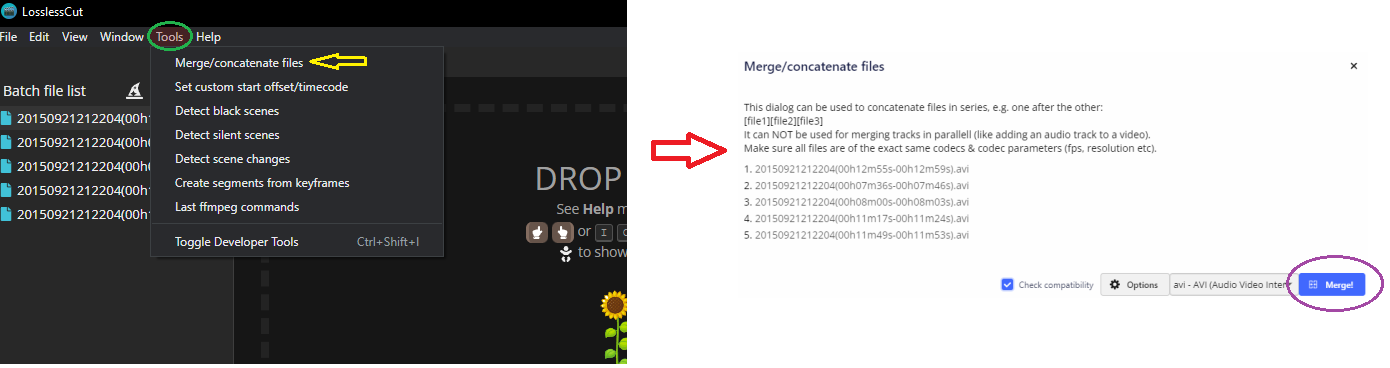
LosslessCut is an amazing free tool that could merge / cut files of almost any format. highly recommended
1 Like
oh wow, i know this tool, yet didn’t know it can merge files o.O
thank you
There are two option I can see here. either export it directly as h265 in TVAI (assuming you not planning to process that file any more)
the other option, the one I use. is merge the ffv1 files or not , then use a tool like Handbrake and encode it / them (if you did not merge the ffv1 files before hand) to x265 and if you did not merge the files before hand, just merge the x265 files with LosslessCut and then delete the FFV1 file(s)
1 Like
@Akila already answered almost everything, so 
 to him.
I use VirtualDub2 to join, cut frames and much, much more. It loads every kind of video, audio and image files.
Avisynth/Vapoursynth can also be used to that.
Anyway… If you intend to use TVAI for BiG jobs where you need to join the files I advice you to get another 2TB SSD. Believe me… it will make a big difference and your oldest SSD will last longer. Or just wait until Topaz implement’s the resuming option to the App. For what I know they are looking into it and should be available soon.
thanks for the advice, but i already upgraded my ssd from 1 tb to 2 tb very recently… even with ssd prices dropping lower and lower, larger drives are still something i’d rather not get unless i’m forced to.
resuming from the app would be nice, but if i’m thinking about the right kind of resume, it wouldn’t be enough. i don’t want to just pause the processing and keep the process in the background, i want to completely stop the process to free up all resources, and to possibly reboot. unless this kind of resume is actually planned, in which case that’s very awesome and i can’t want to see it happen 
I process my videos on a Spindle HDD, not SSD and it’s not any faster then when i tested the process on an SSD. so I got 12TB spindle HDD for around 200$ i use for the job, but that is me.
1 Like
a standard mechanical HDD is also what i considered, but i was afraid that operations such as merging large files would take substantially longer. but after my first time of trying to use ffv1 in my workflow and ultimately altering it, i think an HDD wouldn’t be such a bad idea after all.
also thanks for the suggestion about VirtualDub2 @Carlito , although i have to admit i somehow forgot about this thread and in the meantime i already went off searching for something better for the job than LosslessCut, and i found Avidemux, which worked great (can also encode scattered lossless videos straight into h265, so it solves my dilemma with storage; also does great at previewing merges). it does seem similar to your suggestion though, so if Avidemux ever fails me, i’ll try it out 
